
Attrib command
The attrib command allows an MS-DOS and Windows command line user to change the attributes of a file or files. For example, you could make a file hidden using the attrib command.
If you need to change the ACL (Access Control List) of a file, see the cacls command.
Availability
Attrib is an external command that is available for the following Microsoft operating systems attrib.exe.
- MS-DOS 3.0 and above
- Windows 95
- Windows 98
- Windows Me
- Windows NT
- Windows 2000
- Windows XP
- Windows Vista
- Windows 7
- Windows 8
- Windows 10
- Windows 11
Attrib syntax
Windows 10 and Windows 11 syntax
Displays or changes file attributes.
ATTRIB [+R | -R] [+A | -A] [+S | -S] [+H | -H] [+O | -O] [+I | -I] [+X | -X] [+P | -P] [+U | -U] [drive:][path][file name] [/S [/D]] [/L]
| + | Sets an attribute. |
| - | Clears an attribute. |
| R | Read-only file attribute. |
| A | Archive file attribute. |
| S | System file attribute. |
| H | Hidden file attribute. |
| O | Offline attribute. |
| I | Not content indexed file attribute. |
| X | No scrub file attribute |
| V | Integrity attribute. |
| P | Pinned attribute. |
| U | Unpinned attribute. |
| B | SMR Blob attribute. |
| /S | Processes matching files in the current folder and all subfolders. |
| /D | Process folders as well. |
| /L | Work on the attributes of the symbolic link versus the target of the symbolic link. |
See our attrib examples for information on how to use this command.
Windows 7 and Windows 8 syntax
Displays or changes file attributes.
ATTRIB [+R | -R] [+A | -A] [+S | -S] [+H | -H] [+I | -I] [drive:][path][file name] [/S [/D] [/L]]
| + | Sets an attribute. |
| - | Clears an attribute. |
| R | Read-only file attribute. |
| A | Archive file attribute. |
| S | System file attribute. |
| H | Hidden file attribute. |
| I | Not content indexed file attribute. |
| X | No scrub file attribute |
| V | Integrity attribute. |
| /S | Processes matching files in the current folder and all subfolders. |
| /D | Process folders as well. |
| /L | Work on the attributes of the symbolic link versus the target of the symbolic link. |
See our attrib examples for information on how to use this command.
Microsoft Windows 2000 and Windows XP syntax
Displays or changes file attributes.
ATTRIB [+R | -R] [+A | -A] [+S | -S] [+H | -H] [[drive:] [path] file name] [/S [/D]]
| + | Sets an attribute. |
| - | Clears an attribute. |
| R | Read-only file attribute. |
| A | Archive file attribute. |
| S | System file attribute. |
| H | Hidden file attribute. |
| /S | Processes files in all directories in the specified path. |
| /D | Process folders as well. |
See our attrib examples for information and examples on how to use this command.
Microsoft Windows 2000 and Windows XP Recovery Console syntax
The options below are the available options in the Windows Recovery Console.
Changes attributes on one file or directory.
ATTRIB -R | +R | -S | +S | -H | +H | -C | +C [file name]
| + | Sets an attribute. |
| - | Clears an attribute. |
| R | Read-only file attribute. |
| S | System file attribute. |
| H | Hidden file attribute. |
| C | Compressed file attribute. |
See our attrib examples for information and examples on how to use this command.
Microsoft Windows 95, 98, and Me syntax
Displays or changes file attributes.
ATTRIB [+R | -R] [+A | -A] [+S | -S] [+H | -H] [[drive:][path]file name] [/S]
| + | Sets an attribute. |
| - | Clears an attribute. |
| R | Read-only file attribute. |
| A | Archive file attribute. |
| S | System file attribute. |
| H | Hidden file attribute. |
| /S | Processes files in all directories in the specified path. |
Attrib examples
attrib
Typing attrib by itself displays all files in the current directory and each of their attributes. If any file is hidden, it also displays those files.
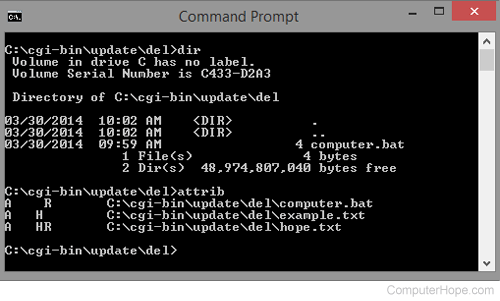
As seen in the example above, we typed the dir command to list the files in the current directory and could only see the "computer.bat" file listed. However, typing attrib by itself shows three files in this directory, "computer.bat" with read-only, "example.txt" with hidden, and "hope.txt" with the hidden and read-only attribute.
attrib +r autoexec.bat
Add the read-only attribute to the autoexec.bat file to prevent it from being modified until the read-only attribute is taken off. This command is helpful for important system files or any other file that you do not want to have mistakenly edited or changed by another program.
attrib +h config.sys
Add the hidden attribute to the config.sys file, causing it to be not be seen by the average user.
attrib -h config.sys
This command does the opposite of the example shown before this one. Instead of hiding the file this command makes the file visible if hidden.
attrib +r +h autoexec.bat
Finally, this example adds two attributes to the autoexec.bat and makes the file read-only and hidden.
Extended information
Below is the MS-DOS and the Windows command line file attributes bit positions and hexadecimal values with bit positions in the order of "7 6 5 4 3 2 1 0."
| Bit Positions | Hex | Description |
|---|---|---|
| 0 0 0 0 0 0 0 1 | 01h | Read-only file |
| 0 0 0 0 0 0 1 0 | 02h | Hidden file |
| 0 0 0 0 0 1 0 0 | 04h | System file |
| 0 0 0 0 1 0 0 0 | 08h | Volume Label |
| 0 0 0 1 0 0 0 0 | 10h | Subdirectory |
| 0 0 1 0 0 0 0 0 | 20h | Archive |
| 0 1 0 0 0 0 0 0 | 40h | Reserved |
| 1 0 0 0 0 0 0 0 | 80h | Reserved |
| Examples | ||
| 0 0 1 0 0 0 0 1 | 21h | Read-only and archive. |
| 0 0 1 1 0 0 1 0 | 32h | Hidden, subdirectory, and archive. |
| 0 0 1 0 0 1 1 1 | 27h | Read-only, hidden, system file, and archive. |
| 0 0 1 0 0 0 1 1 | 23h | Read-only, hidden, and archive. |