
Computer processor (CPU) buying tips
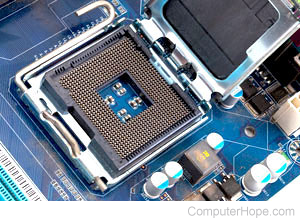
Purchasing a processor is an important consideration when building or buying a computer. Below we have listed several considerations and additional information about what to ask and look for when purchasing a processor directly or already installed into a computer.
Type
The processor can be an important consideration for users who are building a computer. Today, there are three main processor manufacturers: AMD, Cyrix, and Intel. Each of these companies have good and bad reviews, and really each of them are very close in compatibility and reliability. When considering any of these processors verify the motherboard is compatible. For example, if an Intel motherboard is purchased or currently installed into the computer, purchase an Intel Processor, an AMD processor only works on a motherboard designed for AMD.
Considerations
Heat Sink
It is highly recommended that all processors have a heat sink. The heat sink helps to allow for the processor to remain cool and therefore run more efficiently. A computer processor with a missing, bad or failing heat sink can cause the computer to lock up, cause errors or encounter other issues.
When looking at a processor, also consider the heat sink that will be attached to that processor and ensure that the processor being purchased is compatible with that heat sink.
Additional information about computer heat sinks is on our heat sink page.
Interface
Today, there is a wide availability of interfaces the CPU may connect to. Below is a listing of each of the interfaces and a brief description on each of them.
Slot
Slot A
The slot was first used and introduced by Intel when they released the Pentium II processors. This slot was designed to allow users to install the processor into the computer. However, because of the additional cost considerations, Intel has now gone back to the Socket what is now known as the FC-PGA socket. Computers that have the Slot are the Intel Pentium II and early versions of the Intel Pentium III.
The AMD processors use the Slot A interface
Socket
FC-PGA
Flip Chip
Coppermine
The socket is the most commonly used and found interface for processors today. The socket has been used in all Intel processors preceding the Intel Pentium II and is now being used for the Intel Pentium III and above processors with the name FC-PGA, which is short for Field-Programmable Gate Array. The FC-PGA is a socket and not a slot processor and is also known as the Intel Coppermine or the Flip Chip.
Slocket
Slocket, which is a slot card, can be used to connect a socket or FPGA processor. This is not an actual interface but can be an option for users who have a slot adapter with a computer that supports speeds of a socket or FPGA processor.
When looking at the interface of the CPU, it must match that of what is on the motherboard unless it is using Slocket. Additional buying tips on computer motherboards can be found on our motherboard buying tips page.
Names
The names of the processors can be very confusing and are used as a method of helping to sell a computer or computer processor. Below is a listing of some of the more commonly used names and a brief description on each of them.
Intel family names:
Pentium - The 80586, or P5, the Pentium is the generation above the 486 processor line.
Pentium Pro - Chip designed to help speed up Windows 32-bit software
Pentium with MMX - Processor with additional 57 new instructions and enhanced speed to graphics and multimedia software. MMX is now included in all Intel processors that have been released after this processor.
Pentium II and III - The first of the Intel processors to include the Slot adapters. These processors were the next generations of the Intel Pentium processor.
Intel Coppermine - The Socket (FC-PGA) version of the Intel Pentium III and IV.
Intel Flip Chip - Another name for the Intel Coppermine.
Intel Celeron - The low end Intel processors designed to help lower the prices of the computers by reducing or at first eliminating the level 2 cache.
Pentium IV - The next generation of Intel processors, these processors were over 1GHz and were the FPGA processors.
AMD family names:
AMD K6-2 - Socket 7 processor with the 3DNow! technology and first to have the 100MHz bus.
AMD K6-3 - K6-2 chip with Level 2 cache memory that runs at the speed of the CPU.
AMD Duron - Like the Intel Celeron, the AMD Duron is an affordable solution processor allowing for the price in the overall computer to drop.
AMD Athlon - AMD generation with features such as the 200 MHz bus speed
AMD Thunderbird - The latest AMD processor, this processor is the socket version.
Speed
The speed of the processor is an important consideration as it is what will rate the speed of the computer and help the computer run faster overall.
When looking at the speed of processors available, we highly recommend that you do not purchase or consider purchasing a processor that has just been released. The price of the processor will be at a premium price and if you give that processor 2-4 months it will drop in price dramatically.
Effects
Upgrading the computer processor may have the below effects on the computer.
- Allow for programs that may require steeper processor requirements to be run.
- Help the computer or computer programs speed in load and opening time. Note: In many cases this may not be noticed or will not be dramatic.
CPU installation
Additional help and information about installing a computer processor and other computer hardware can be found through our Installation section.