
USB buying tips
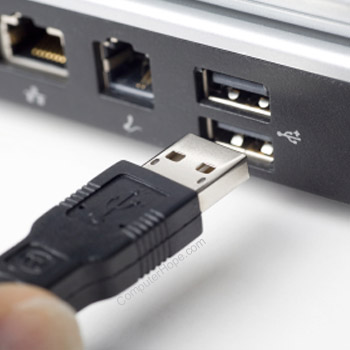
Today, there is a wide variety of available USB devices, and purchasing a new USB device an be confusing at times. Below we have listed various information, tips, and help for purchasing computer USB devices.
USB devices
With the popularity and ease of connecting and installing a USB device, there is a very large selection of USB devices that can be connected to the computer. Below is a listing and a brief description of available USB devices out today.
Backup drives
Drives such as the Iomega Zip drive are an excellent USB device as they can be used to transfer large files between two computers or to allow for an easy to use and relatively fast backup solution.
Camera
Digital cameras are becoming a popular peripheral and used product. A USB camera allows good transfer rates when sending pictures from the camera to the computer, and will be easy to connect to the computer.
CD Drive
USB CD Drives are becoming a great solution for users who want to add an additional drive or a CD-RW drive to the computer or portable computer. USB CD drives offer a decent speed and are easy to connect through Windows. It is important to note these drives cannot be used to restore software through MS-DOS.
Game device
Because of the popularity of games, a USB game device such as a USB joystick or USB racing wheel is an excellent solution for any computer gamer. These devices allow for fast response times as well as ease of connectivity and installation.
Hard drive
Like CD drives and backup drives, a USB hard drive is another excellent consideration when looking at upgrading or adding a new hard drive to the computer. With a USB hard drive you have the ease of connecting the drive to different computers as well as the ability to connect and disconnect the drive while it is on.
USB hub
When more than one or two USB devices are connected to the computer it may be required that a USB hub be purchased. The hub allows for additional devices to be connected to it. The USB standard allows for up to 127 different devices.
Monitor
While the monitor is not only USB a USB monitor allows for users to have additional features, such as setting up the monitor display settings through software instead of with buttons on the monitor. Most USB monitors also have built-in hubs that also allow for additional USB devices to be connect to the monitor.
Mouse
A USB mouse is a great solution for users that may be using their serial ports and their PS/2 ports. A USB mouse also allows for a faster response time, especially if the mouse is an optical mouse. This is an excellent solution for users who are FPS (First Person Shooter) game players.
Printer
A USB printer allows for a user to connect a printer or multiple printers to a computer. With a USB printer, the user will experience a faster response time as well as additional features not found on a standard printer.
Scanner
Like the USB printer, a USB scanner is an excellent solution for users who just need to hook up a scanner quickly or move a scanner from computer to computer. USB scanners offer a faster transfer rate when compared to a serial or parallel scanner and are very easy to install.
Speakers
While USB speakers may not be easier to install than standard speakers, USB speakers can offer a wide range of additional options not available with standard speakers.
Considerations
Availability
Before purchasing a USB device, ensure that USB is available on your computer and properly working. Additional troubleshooting and help with USB is on our USB help and support page.
If you have utilized all of your USB ports, you need to purchase a USB hub to connect additional USB devices to the computer.
Requirements
When looking at the USB device, ensure that you meet the system requirements. Many USB devices today require at least Windows 98 or higher.