
Preventing a spreadsheet formula from changing when copying
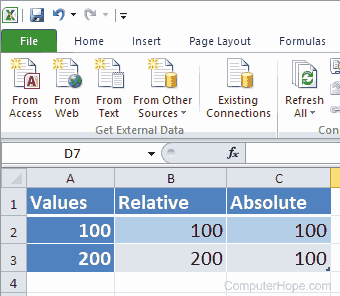
When a formula is created in a Microsoft Excel spreadsheet or another spreadsheet program, it is created using a relative cell reference by default. When copying a formula that's using a relative cell reference, the formula is going to become relative to where it is being pasted. For example, if cell B2 had the formula "=A2" that was copied to cell B3, it would become "=A3" because it's relative to where it's being copied.
To prevent a formula from changing when it is copied, you must change the formula in part or in whole to use an absolute cell reference. If you created an absolute cell reference in cell C2 that was "=$A$2" and copied the cell to C3 (or any other cell), it remains absolute and never change.
Additional absolute cell reference examples
Absolute cell references can be used in all parts of a formula or can be used for a row or column that you want to remain absolute. To make a row or column absolute, it must begin with a dollar sign ($). Below are some additional examples of how an absolute cell reference may be used in a formula.
Relative column and absolute row reference
=A$2
The above formula uses a relative column with an absolute row reference. If the cell formula was copied, the row would always remain the same (2), but the column would be relative to its copy location.
Absolute column with a relative row reference
=$A2
The above formula uses a relative column with an absolute row reference. If the cell formula was copied, the row would always remain the same (A), but the column would be relative to its copy location.
Absolute cell reference with a relative cell reference
=SUM($A$2+B2)
The above formula uses the value in A2 but add the next relative cell. If the cell formula was copied from C2 to C3, it would become "=SUM($A$2+B3)."