
Why is the floppy drive reading as B and not A?
Floppy drive improperly configured in BIOS
Verify that the floppy drive is correctly configured in your BIOS setup. If the floppy drive is set up as floppy drive B:, Windows detects the drive as B: and not the A: drive.
With some earlier release of MS-DOS users can type B: and it would switch automatically to the A: drive.
Floppy drive cable not correctly connected
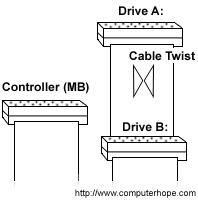
If hardware was recently added in the computer or you have recently installed a new floppy drive, verify that the cable connected to the floppy drive correctly connected.
As illustrated above, the floppy drive A: should connect to the end of the cable after the twist. If your floppy drive cable does not have two connections, this is not the issue.
Windows issue
If you are running Windows 9x, Windows 2000 or Windows Me verify that Windows Device Manager does not have any conflicts or other devices. If conflicts or other devices are present, resolve those issues.
Computer has LS-120 or BIOS issue
If the computer has an LS120 drive, you may be experiencing any of the below situations.
- The drive is not correctly configured in BIOS. Some computers may require that the floppy drive be disabled as the LS120 drive is an IDE (Integrated Drive Electronics) device.
- If software is required for the LS120 drive, verify that it is installed on the computer.
- Verify that there are no available updates for your BIOS that might apply to this issue.