
How to rename or label a disk drive

Many users like to change the label or volume name of their disk drives for one reason or another. Whether it's to keep things organized or personal preference, this page shows users how they may change the name of a drive.
These steps only work for physical drives. If a drive was created with the subst command or another software utility, you cannot rename it.
While you can rename a removable drive, like an external hard drive or USB (universal serial bus) flash drive, it reverts to its default name after disconnecting and reconnecting the drive.
This page explains how to rename a drive label. We have a different page that shows how to change drive letters. For help with changing driver letters, see: How to change a drive letter.
Windows 8, 10, and 11
- Open File Explorer.
- In the left navigation menu, click This PC.
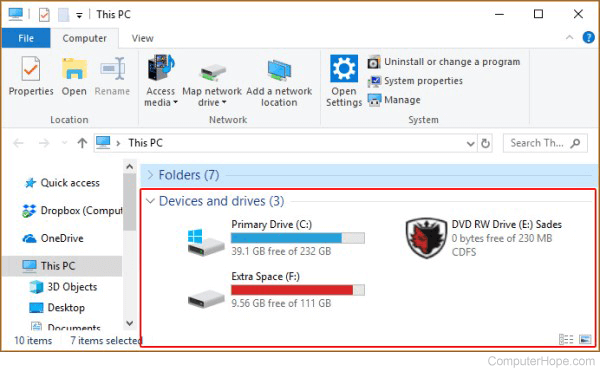
- Right-click the drive you want to rename.
- In the drop-down menu, select Properties.
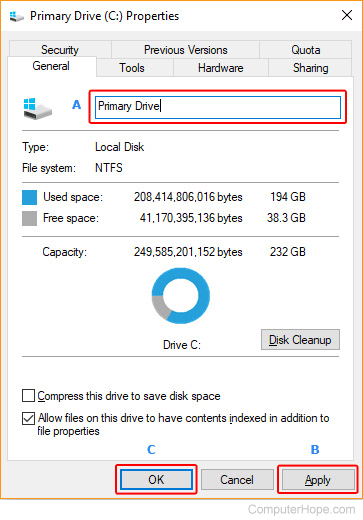
- In the Properties window, on the General tab, type a new name in the Label box (A), click Apply (B), and then OK (C).
Windows 95, 98, XP, Vista, and 7
- Double-click the My Computer icon on the Windows desktop, or select My Computer in the Start menu.
In Windows Vista and Windows 7, My Computer is named Computer on the desktop and the Start menu.
- In My Computer, right-click the drive you want to rename.
- In the drop-down menu, select Properties.
- In the Properties window, on the General tab, type a new name in the Label box (A), click Apply (B), and then OK (C).
Windows 3.x, MS-DOS, and Windows command line
To change the name of a disk drive from an MS-DOS prompt, use the label command.
- Type the word label.
- Type the drive letter you want to rename.
- Type the new name for the drive.
The example below would change the C: drive to the name "Hope."
label c: Hope