
How to double space or change line spacing in Microsoft Word
Updated: 05/03/2022 by Computer Hope

When typing in Microsoft Word, you might need to change the line spacing, depending on the document's style. The steps to enable double spacing differ slightly between versions. Consequently, you may need to use intuition to adapt them for older versions.
Tip
Use the keyboard shortcuts Ctrl+1 to single space, Ctrl+2 to double space, or Ctrl+5 to set the spacing to 1.5 line spacing on any line, paragraph, or all highlighted text.
Note
When pressing Enter, it starts a new paragraph with extra space between the two paragraphs. To go to the next line without starting a new paragraph, press Ctrl+Enter.
To increase or decrease line spacing or enable double spacing, select a link below and follow the steps.
Enable double spacing for the whole document
Microsoft Word 2016 and later (Office 365), and Word Online
- Open Microsoft Word.
- On the Home tab, in the Paragraph group, click the Line and Paragraph Spacing (
 ) icon.
 - Select the desired spacing option from the available list.
- For additional spacing options, select Line Spacing Options in the list.

Microsoft Word 2007, 2010, and 2013
- Open Microsoft Word.
- On the Home tab, in the Styles group, right-click Normal.
- Select Modify from the drop-down menu.
- Under Formatting, click the Double Space button (shown below).

- Click OK.
or
- Open Microsoft Word.
- Click the Page Layout tab.
- Click the down arrow in the bottom right corner next to Paragraph to bring up the Paragraph window.
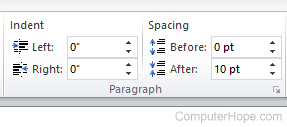
- In the Paragraph window, make sure you are on the Indents and Spacing tab.

- Click the down arrow next to the Line spacing box.
- Select Double and click the OK button.
Modify line spacing for all or part of an existing document
Microsoft Word 2007 and later
- Open Microsoft Word and the document you want to modify.
- Highlight the text where you want to change the line spacing or select all.
- Right-click the highlighted text, and select Format and then Paragraph, or only Paragraph or Paragraph Options, depending on your version of Word.
- In the Paragraph window, make sure you are on the Indents and Spacing tab.
- Click the down arrow in the Line spacing drop-down box.
- Select Double and click the OK button.