
How to create a named cell in Microsoft Excel
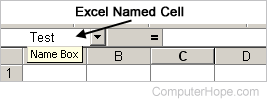
To create a named cell in Microsoft Excel, select the cell and click the Name Box next to the formula bar, as shown in the image. This bar has the current cell location printed in it. For example, if you're in cell A1, it should currently say A1 in the Name Box. In the Name Box, type the name you want to name the cell and press Enter.
Once a cell is named, you can refer to this cell in a formula, chart, or anything else that uses cell references. For example, let's assume you named a cell profits. When creating a new formula, you could type =sum(B10+profits) to add cell B10 plus the value in the profits cell.
When naming a cell or range, it can only be one word with no spaces.
In Excel, use the keyboard shortcut Ctrl+F3 to open the Name Manager. In the Name Manager, you can create, edit, and delete any Excel names. Once a name is created, you can use the keyboard shortcut F3 to insert any name.
Why is it beneficial to name cells in a spreadsheet?
It is easier to use the name of a cell instead of the cell reference. For example, it's easier to remember "profits" (as mentioned earlier) instead of the cell containing the profits value.