
How to find what file system is running on my hard drive
Updated: 04/02/2019 by Computer Hope
To determine the file system running on your computer's hard drive, select your version of Windows in the list below and follow the provided steps.
Determining file system in Windows 2000, XP, Vista, 7, and 8
- Open My Computer.
- In My Computer, Computer, or This PC, right-click the drive you want to view and select Properties.
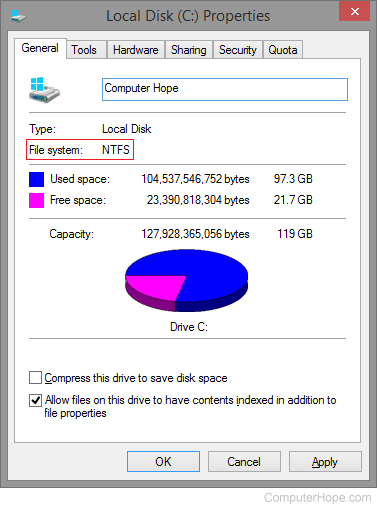
- The Properties window should list the file system on the General tab. As shown in the picture below, the file system of this computer is NTFS (NTFS file system).
Microsoft Windows 2000 and Windows XP users with administrative privileges can also see what file system is running on their computer by following the steps below.
- Open the Control Panel.
- Open Administrative Tools (XP Professional users need to open Performance and Maintenance and then Administrative Tools).
- Open the Computer Management.
- In Computer Management, under Storage, click Disk Management, which displays all drives and each of their file systems and other important information about the drives.
Determining file system in 3.x, 95, 98, and Me
Users of Microsoft Windows 3.x, Windows 95, Windows 98, or Windows Me can determine the file system (FAT version) by running the fdisk command to display the partition information. See the fdisk command page for additional information and help with this command.
Users using Microsoft Windows 98 or Windows Me
Users running Microsoft Windows 98 or Windows Me can also determine the file system that is running on the computer by following the steps below.
- Open My Computer.
- In My Computer, right-click the drive you want to view and select Properties.
- The Properties window should list the file system on the General tab.