
How to copy text from an Adobe PDF file
From time to time, users need to copy text from an Adobe PDF (Portable Document Format). The following sections contain step by step instructions on how to do so based on the program you're using and its version. To proceed, select the link that applies to you from the below list.
Not all browsers and online readers support copying text from a PDF. Most of the time, you'll only be able to select certain portions of the PDF or none at all. We suggest downloading the file and opening it in the Adobe Reader program for the best results.
Copying text in an online PDF reader
- Open the PDF in your online reader or Internet browser by clicking the link to the file.
- Select the text you want to copy by pressing the left mouse button and dragging across the text. Again, this may not work in many online programs.
- Press and hold Ctrl and C on your keyboard. You can also right-click with your mouse and select Copy in the drop-down menu.
- Open a word processor or text editing program.
- Paste the copied text into a word processor or text editor by pressing and holding Ctrl and V on your keyboard. You can also right-click with your mouse and selecting Paste in the drop-down menu.
Copying text in Adobe Reader DC

Before trying the steps below, look at the top title bar. If the document says (SECURED), as shown in the picture, the PDF file is copy protected and prevents you from copying the text using the steps below. See our copying text from a secured PDF section for steps to bypass the PDF security.
- Open the PDF in your online reader or Internet browser by clicking the link to the file.
- Select the text you want to copy by pressing the left mouse button and dragging across the text. Again, this may not work in many online programs.
- Press and hold Ctrl and C on your keyboard. You can also right-click with your mouse and select Copy in the drop-down menu.
- Open a word processor or text editing program.
- Paste the copied text into a word processor or other text editor by pressing and holding Ctrl and V on your keyboard. You can also right-click with your mouse and selecting Paste in the drop-down menu.
Copying text in Adobe Reader X or later
- If you've opened the PDF in your Internet browser, hover your mouse cursor over the open document to look for an option to download it.
- Once you've downloaded the file, open it in Adobe Reader.
- In the opened PDF document, right-click with your mouse and click Select Tool (a check mark appears when selected).

- Select the text you want to copy by pressing the left mouse button and dragging across the text.
- Press and hold Ctrl and C on your keyboard. You can also right-click with your mouse and select Copy in the drop-down menu.
- Open a word processor or text editing program.
- Paste the copied text into a word processor or other text editor by pressing and holding Ctrl and V on your keyboard. You can also right-click with your mouse and selecting Paste in the drop-down menu.
If you cannot highlight any PDF text using the steps above, it likely has copy protection. Only professional (paid) versions of PDF programs can remedy this issue.
Copying text in Adobe Reader 9 or earlier
- If you've opened the PDF in your Internet browser, hover your mouse cursor over the open document to look for an option to download it.
- Once you've downloaded the file, open it in Adobe Reader.
- In the PDF document, click the Select tool in the toolbar, as seen in the following image.
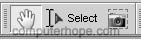
- Once this option is chosen, highlight the text you want to copy and click Edit and then Copy. You may also right-click the highlighted text and click Copy or Copy to clipboard.
- Paste the copied text into a word processor or other text editor by pressing and holding Ctrl and V on your keyboard. You can also right-click with your mouse and selecting Paste in the drop-down menu.
If you cannot highlight any PDF text using the steps above, it likely has copy protection. Only professional (paid) versions of PDF programs can remedy this issue.
Copying text from a secured PDF
A PDF file is often secured to prevent you from copying the content because the author or company who produced the PDF is protecting their Copyright. If you're attempting to copy text from a PDF for commercial use, you must obtain explicit permission from the Copyright holder. If you need to copy text for personal use, or for accessibility reasons, the following steps help you copy edit-restricted text.
For a PDF, it is possible to add the following types of document restrictions.
- Printing: Allowed or Not Allowed
- Document Assembly: Allowed or Not Allowed
- Content Copying: Allowed or Not Allowed
- Content Copying for Accessibility: Allowed or Not Allowed
- Page Extraction: Allowed or Not Allowed
- Commenting: Allowed or Not Allowed
- Filling of form fields: Allowed or Not Allowed
- Signing: Allowed or Not Allowed
- Creation of Template Pages: Allowed or Not Allowed
To view a PDF's security properties in Adobe Reader, click File, Properties, and click the Security tab.
To bypass or reset the PDF security settings, we're using Google Chrome to print the PDF as a new one, which won't have any of the original PDF's security settings.
- Open Google Chrome. If Google Chrome is not installed on your computer, you can follow our how to install Google Chrome steps.
- Drag the PDF file you want to convert to Chrome, which should open the PDF in Chrome. If the PDF is downloading, but won't open, see: How to change browser download settings for PDF files.
- Once the PDF is open in Chrome, click the printer icon or use the Ctrl+P keyboard shortcut.
- In the print window, click the Change button and change the Destination to "Save as PDF."
- Click the Save button.
- Once saved, open the PDF in any reader, and copy and paste the text using the steps mentioned above.