
Missing My Computer, My Network Places, or My Documents icon
Updated: 12/05/2021 by Computer Hope
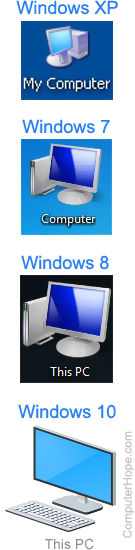
After installing Windows, you may only see the Recycle Bin icon on the desktop. If you are missing the My Computer, This PC, My Network Places, or My Documents icons on the desktop, follow the steps below to display them.
Note
As seen in the example picture, the My Computer icon changed to "Computer" or "This PC," depending on your Windows version.
Missing icons in Windows 11
- Right-click an empty area on the desktop and select Personalize.
- Click the Themes option on the right side of the Personalization window.
- Scroll down to the Related settings section and click the Desktop icon settings option.
- In the Desktop Icon Settings window, select the check boxes next to the icons you want to display.
- Click Apply, and then OK.
or
- Click the Search magnifying glass icon on the taskbar, type themes and related settings, and press Enter.
- Scroll down to the Related settings section and click the Desktop icon settings option.
- In the Desktop Icon Settings window, select the check boxes next to the icons you want to display.
- Click Apply, and then OK.
Missing icons in Windows 10
- Right-click an empty area on the desktop and select Personalize.
- In the window that opens, click Themes in the left navigation menu.
Note
If you do not see Themes on the left side of the window, make sure the window is big enough to show all options. Otherwise, skip to the next suggestion.
- Scroll down and click Desktop icon settings under Related Settings.
- In the Desktop Icon Settings window, select the check boxes next to the icons you want to display.
- Click Apply, and then OK.
or
- Click Start or press the Windows key.
- Type themes and related settings and press Enter.
- Scroll down and click Desktop icon settings under Related Settings.
- In the Desktop Icon Settings window, select the check boxes next to the icons you want to display.
- Click Apply, and then OK.
Missing icons in Windows 8 and 8.1
- Right-click an empty area on the desktop and select Personalize.
- In the left navigation pane, click the Themes option.
- Scroll down to the Related Settings section and click Desktop icon settings.
- Select the check boxes next to the icons you'd like displayed.
- Click Apply, and then OK.
Tip
"My Documents" is named User's Files, and "My Network Places" is named Network.
Missing icons in Windows XP, Vista, and 7
- Right-click an empty area on the desktop and select Personalize.
- In the new window, select Change desktop icons from the menu on the left side.
- Under Desktop icons, select the check boxes next to the icons you want to display.
- Click Apply, and then OK.