
Determining what service pack I have installed in Windows
Updated: 12/09/2018 by Computer Hope

To see the Service Pack that's installed for Windows on your computer, follow the steps below.
Viewing system properties
- Right-click My Computer, found on the Windows desktop or in the Start menu.
- Select Properties in the popup menu.
- In the System Properties window, under the General tab, the version of Windows is displayed, and the currently-installed Windows Service Pack.
The picture below is an example of what this screen may look like in Microsoft Windows 7. In this example, Service Pack 1 is currently installed.
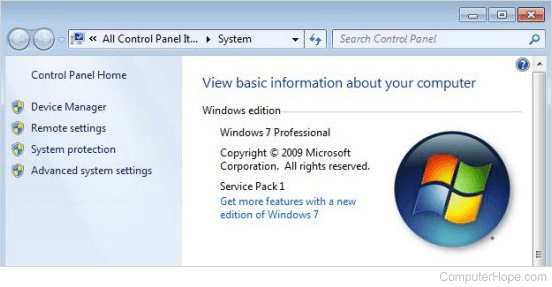
Your system information may look different, for example:
Microsoft Windows 2000
5.00.2195
Service Pack 4
Microsoft Windows XP
Home Edition
Version 2002
Service Pack 1
Alternate method
- Click Start.
- In the Search text box, type winver and press Enter. Running this command gives you a window similar to the example below, which as shown, contains the full version information including Service Pack.
Tip
In Windows 10, you can type winver in the Search text box on the Windows taskbar, next to Start.

Windows XP Windows Version window