
How to remove a laptop battery
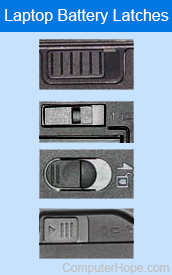
All laptops are different, however, they usually share similarities when removing the main battery. That said, all newer MacBooks from Apple use integrated batteries that require service to remove. Most smaller PC laptops, those with a screen size of 13 inches or less, like an Ultrabook, also have a built-in battery that is not accessible. If your laptop's battery is not accessible, help from a repair technician to change the battery is likely necessary.
If you are using a Windows or Linux based laptop, this page provides a general idea on how to remove the laptop battery. If you are replacing a laptop battery, insert the new battery after removing the old battery.
Removing the battery
- If your laptop is plugged in, either unplug it or disconnect the power cable.
- Turn your laptop over so the bottom is facing up.
- Locate the battery latch on the bottom of the laptop. The image above shows some common battery latches found on laptops.
- To remove the battery, slide the latch switch to the opposite side and hold it open until the battery is released.
- On some laptops, the battery pops out on its own. On others, you must pull the battery out gently with the tips of your fingers.
Other situations
Although most laptops only have one latch, there are some that require you to slide two latches to remove the battery. On these laptops, the latches still look similar to the examples above, but require you to move both at the same time, usually towards each other.
There are also some older laptops (IBM laptops) that require the latch to be pulled out and then pushed towards the battery.
No battery latch found
If you cannot find any latches or buttons for releasing the battery, it is likely the laptop utilizes a different mechanism to release the battery. The laptop may need to be serviced by a licensed repair technician who can remove it through partial or full disassembly of the laptop.
We recommend referring to the laptop documentation or checking the manufacturer's website for steps to remove the battery. The documentation or website helps you determine if servicing is required to remove the battery.