
Address bar
The term address bar refers to the text field in a web browser that identifies the user's location on the web and allows them to access different websites. The address bar is known as a location bar, and in Google Chrome, it's called the omnibox.
Address bar overview
All address bars are located at the top of the browser window, as you can see in the image below.
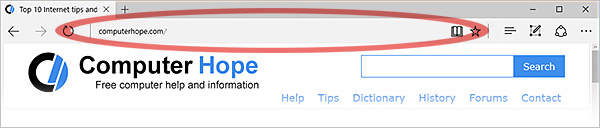
When the browser is being viewed in fullscreen mode, the address bar is hidden. To get out of fullscreen mode and view the address bar again press F11 or Esc.
Using the address bar
The user can edit the text to navigate to a new location. For instance, clicking the mouse in the address bar lets you change the address or delete it and enter a new one. The address should be a URL (uniform resource locator), such as computerhope.com.
Address bar examples
Below are examples of how the address bar may look in your browser.

Internet Explorer 6 address bar.

Internet Explorer 7 secure address bar.

Opera address bar in Debian 8 Linux.

Microsoft Edge address bar in Windows 10.

Google Chrome Omnibox in macOS.
Using a keyboard shortcut to edit the address
On the Windows or Linux operating systems with an open Internet browser, pressing Ctrl+L or Alt+D moves the text cursor to the address bar. Doing so also automatically highlights the entire address for editing.
To do the same thing on macOS operating systems, press Command+L (hold down the Command key and press L).
When the address is selected, press ← or → arrow keys to move the cursor to the beginning (or end) of the current address. You may also begin typing to overwrite the current address.
Press Enter when you're done, and the browser will navigate to the new address.
The keyboard shortcuts Ctrl+E and Ctrl+K also place the text cursor in an empty address bar in most browsers.
After typing an address in the address bar, press the keyboard shortcut Alt+Enter to open that address in a new tab.
What is the icon found on some address bars?
The icon shown on the address bar for some websites is known as the favicon. Further information and help with creating this icon is on the page linked below.