
Apple menu
Updated: 03/13/2021 by Computer Hope
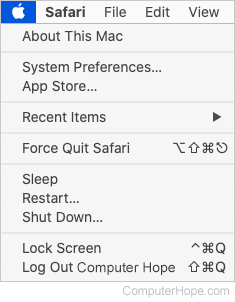
Found on all Apple Macintosh computers, the Apple menu is accessed by clicking the Apple icon in the top-left corner of the screen. As shown in the picture, the Apple menu allows users to change the settings or configuration of their computer or its peripherals. With earlier versions of the Mac, this image may have been a rainbow apple  icon.
icon.
Tip
If you're more familiar with Windows, you can think of the Apple menu as the same as the Windows Start menu.