
Forum
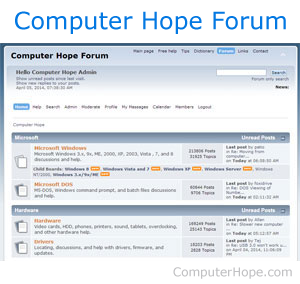
Not to be confused with a form, a bulletin board (BB or Bboard), discussion forum, discussion board, and forum is an area where users share thoughts, ideas, or help by posting text messages. Forums are different from chat because it is almost never live and can be read at any time. The picture shows an example of what a forum may look like and an example of the Computer Hope help forum.
Forum etiquette
Below is a short list of forum etiquette that should be followed when using any online forum.
- Behave the same way you would when talking to people in real-life.
- Avoid chat slang.
- When creating a new post, create a short descriptive subject for the topic of or reason for the post.
- Try your best to spell all words correctly and use proper punctuation. However, also realize that no one is perfect.
Improve your spelling using a browser spell check tools. For help with spell checking online forms, see: How to spell check text in an online form.
- Give your post some time to get responses or answers to the question. Continuously bumping a message or nagging other members to respond does not help and is usually frowned upon.
- Do not WRITE IN ALL CAPS as it makes you appear like you're yelling.
- Read the "Readme first" posts or other sticky posts before creating a new post.
- Respect all other members on the forum.
- Try not to go into too great of detail or making a post more than three paragraphs long. Long posts may get a TL;DR reply.
- Don't reply to old threads or necropost.
- Abide by the rules created by those running the forum.
Administrator, BBC, Bump, Chat terms, Computer abbreviations, First, Internet, Internet terms, Lock, Moderator, Newsgroup, Post, Profile, Signature, Social network, Sticky, Talk, Thread, TLDR, Unlock, Web design terms