
KVM
KVM may refer to any of the following:
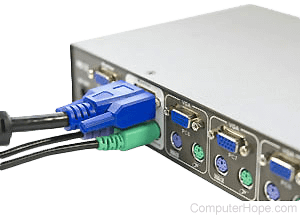
1. Short for keyboard, video, and mouse switch, a KVM switch enables you to share a single keyboard, mouse, and monitor between multiple computers. KVM switches make for a cleaner environment and enables someone who needs access to multiple computers, but not all at the same time, to have an easy solution.
For a KVM switch to work, you must also have additional cables for each computer you want to connect to the KVM switch. These cables are usually a separate purchase from the main KVM switch. To set up the KVM switch, connect a single keyboard, mouse, and monitor to the KVM switch. Then, use the extra cables to connect each of the computers to the KVM switch.
After connecting everything together, a button on the front of the KVM switch changes between each of the computers. You may also press a combination of keys on the keyboard to switch computers.
KVM manufacturers
When purchasing a KVM switch, make sure you purchase a KVM switch that supports the hardware you want to use with all your computers. For example, many KVM switches utilize PS/2 ports; to use a USB (universal serial bus) keyboard or mouse, make sure you purchase a KVM switch that supports USB.
2. The term KVM is an acronym for Kernel-based Virtual Machine. KVM is used by the Linux kernel for system virtualization. Using a virtual computer environment can be advantageous in that it does not require additional hardware to set up. Rather, it uses resources from the existing computer system (including hardware) that is hosting it. Using KVM with a user space allows users to set up a virtual environment for many uses, including software testing and other user workspaces.
Linux 2.6.20 was the first operating system, based on the Linux kernel, to include KVM and was released in February 2007. Many operating systems implement KVM, including OpenIndiana, Red Hat Enterprise Linux, SUSE Linux, Ubuntu, and Gentoo. Using KVM on a particular computer system requires the processor to feature a hardware virtualized extension. KVM supports several processor types: x86, S/390, PowerPC, and IA-64. ARM (Advanced RISC Machine) processors will soon be supported as well. KVM environments use a specific BIOS (basic input/output system) called SeaBIOS and are capable of emulating hardware components like video cards, sounds cards, network cards, RAM (random-access memory), and CPUs. Managing these environments can be done using several graphical management tools, including Witsbits, ConVirt, OpenNode, SolusVM, and Virtualbricks.
A-B Box, Computer abbreviations, Hub, Linux, Operating system terms, Virtual machine