
Tabbed browsing
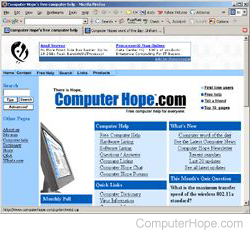
Tabbed browsing is a form of Internet navigation that allows a user to browse multiple web pages in a single window. These additional pages are denoted by tabs at the top of the browser window. This feature is for users who do want to view multiple sites simultaneously, but don't want to have multiple browser windows open. In the image, you can see that the Mozilla Firefox 1.0.7 window has two tabs open, near the top of the browser window.
Helpful tips about tabbed browsing
Browsers that support tabbed browsing, such as Chrome, Firefox, Opera, and Internet Explorer, allow users to open a link in a new tab by clicking it with your middle button (mouse wheel). You can also right-click a link and choose the option to open the link in a new window.
Use the keyboard shortcut Ctrl+T to open a new tab. You can open any previously closed tab by pressing Ctrl+Shift+T.
To close the current tab in most Internet browsers, press Ctrl+W, or click the X that appears on the tab when you hover the mouse pointer over it. You can also right-click a tab and choose the option to close other tabs.
To move forward between tabs, press Ctrl+Tab on your keyboard. To move to the previous tabs, press Ctrl+Shift+Tab.
Another example
Below is another image that shows how Internet tabs may look. In this example, you can see two tabs open in Google Chrome. Clicking either of these two tabs would switch between the open pages.

Active tab, App Tab, Browser, Firefox, Internet terms, Opera, Tab