
Microsoft HyperTerminal help
HyperTerminal is communications software developed by Hilgraeve and is included in Windows 3.x through Windows XP. With HyperTerminal, you can connect and transfer files between two computers using a RS-232 serial cable.
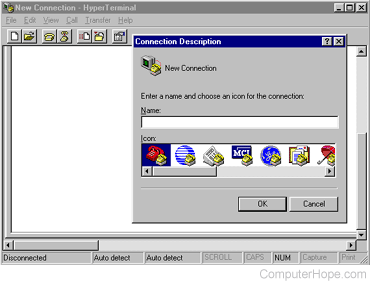
HyperTerminal was widely used by many Windows users to connect to Bulletin Board Systems and today is not as commonly used with the Internet. Although not used today, HyperTerminal can still help test a computer modem.
HyperTerminal is not included in Windows Vista and later versions of Windows.
How to run HyperTerminal
Windows Vista and later
HyperTerminal is not included in Windows Vista, Windows 7, Windows 8, and Windows 10. However, HyperTerminal Private Edition is available from Hilgraeve for purchase, which is designed to run on Windows Vista through Windows 10.
If you can access Windows XP, another option to try is the following.
- In Windows XP, open Windows Explorer.
- Navigate to the C:\Program Files\Windows NT folder and copy the hypertrm.exe file.
- Navigate to the C:\WINDOWS\system32 folder and copy the hypertrm.dll file.
- Save the copied HyperTerminal files from Windows XP in the same folder paths on the newer computer with Windows Vista or later. The same folder paths should exist and not need to be created.
- On the newer computer, double-click the hypertrm.exe file in the C:\Program Files\Windows NT folder to run HyperTerminal.
If HyperTerminal doesn't run in step 5 above, you may need to run the file in Windows compatibility mode for it to work, see: How to change the Windows compatibility mode.
Windows XP
- Click Start > All Programs > Accessories > Communications.
- In the Communications folder, select HyperTerminal. If you do not see HyperTerminal, it may not be installed.
Windows 95, Windows 98, Windows Me
- Click Start > Programs > Accessories.
- In the Accessories folder, click or double-click HyperTerminal. If you do not see Hyper Terminal, click the Communications folder and click HyperTerminal. If you cannot locate HyperTerminal, it may not be installed.
Windows 3.x
- Access the Program Manager.
- In the Program Manager window, open the Communications folder. If you don't see a Communications folder, look for the Accessories group.
- Double-click the Terminal icon.
How to install, uninstall, or reinstall HyperTerminal
To install, uninstall, or reinstall HyperTerminal in Windows XP and earlier, follow the steps below.
- Open the Control Panel.
- In the Control Panel, double-click Add/Remove Programs.
- In the Add/Remove Programs window, click the Windows Setup tab.
- Double-click the Communications icon.
- Check or uncheck the HyperTerminal option, to install or uninstall the program. To reinstall HyperTerminal, uncheck HyperTerminal and click OK. Then, repeat the process above and re-check HyperTerminal.