Computer Hope

Other Pages

Home
Site map
Computer help

Dictionary
News
Q&A
What's new

Tools

E-mail this page
Print Preview
Edit this page


Computer Hardware
Information about computer cases (chassis)

Quick links

Chassis ABCs
Types of cases
Different style cases
Case Colors
Case cleaning

CHASSIS ABCs

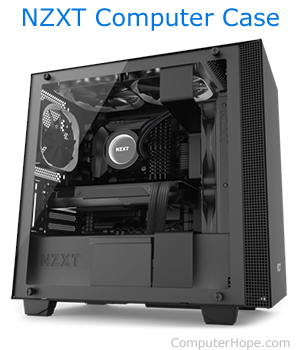
The computer case or chassis is the body of the computer. Cases allow for manufacturers to include all computer comments together and have it able to be moved, if needed. Below we have listed types of cases as well as general specifications and information about the cases.

TYPES OF CASES

Below is a listing of the major types of cases and what you can expect from each of them.

MINI TOWER

Advantages:
Excellent size which can be placed on top or below of a computer desk.
Disadvantages:
While this case does offer upgradability, it can be filled up much faster than the Mid-Sized tower.
Recommendations:
Great PC for end-users and small businesses.

MID-SIZE TOWER

Advantages:
Excellent case which can fit below and on top of your computer desk.
Plenty of expandability for new devices for businesses, end-users, and advanced users.
One of the most used computer cases found today.
Disadvantages:
None
Recommendations:
This case is an excellent choice for all users and businesses.

FULL-SIZED TOWER

Advantages:
Excellent computer for upgradability.
Excellent case for a server machine.
Disadvantages:
Cost is going to be a lot more than a standard case.
Generally a large case which cannot be placed on top or beneath a desk.
Recommendations:
We recommend that this type of case be purchased by advanced users or users who plan to have a stand alone machine as a server.

DESKTOP

Advantages:
Excellent desk computer.
Great use of desk space when monitor is placed on top of the computer.
Disadvantages:
With some types of desktop cases can be very difficult to upgrade.
Does not really work on the floor.
Recommendations:
Excellent choice for a business and home user computer. End users planning to upgrade or place computer on floor we recommend going with tower computer unless the manufacturer provides a desktop that can be converted to tower.

SLIMLINE DESKTOP

Advantages:
Excellent for workstations in large companies.
Great computer for a low budget PC.
Excellent computer for locations which may not have large area of workspace.
Disadvantages:
Generally little or no room for adding additional peripherals.
Usually require an LPX motherboard.
Recommendations:
We recommend that this type of case be purchased only for companies employees as workstations.

DIFFERENT STYLE CASES

I am getting tired of the standard looking case. I would like to find a case with style and possibly a clear case. Where can I find a company that can supply me a case like this?

There are several types of companies that manufacture cases with more styles as well as clear cases. You can find these as well as other case manufacturers on our network.

CASE COLORS

Today there is a wide variety of computer case colors, below is a listing of the more popular colors as well as a brief description on each color if needed.

Black - Standard black case.
Urban White - Offset white. Most computers and computer hardware are this color.
White - White or very light color.

In addition to the above standard colors, there are computer manufacturers and case manufacturers who also have blue, orange, pink, red, silver, and yellow. 

As well as a wide range of available colors, there are also translucent cases which have a semi clear color look to the case.


Index

Category:
Hardware

Companies:
Click here

Related Pages:


Resolved


Were you able to locate the answer to your questions?


CHASSIS TROUBLESHOOTING

Reference

Issue / Question
FORUM If your question is not listed on this page please try our online forum.
CHADD Additional information with installing computer hardware.
CH000765 How do I open my computer case?


Home - Computer help - Contact - Dictionary - Links
Link to Computer Hope - Bookmark Computer Hope