
How to fix the missing operating system error
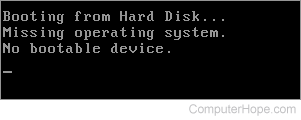
If you are receiving the Missing operating system or Operating System not found error message, follow the steps below. Select the version of Windows you are using to jump to instructions for your computer.
Windows 8 and 10
Make sure the installation disc is designed for the version of Microsoft Windows on your computer. For example, do not use a Windows 7 installation disc for a Windows 10 computer.
- Insert the Windows installation disc into the disc drive and restart the computer to boot from that disc.
- Watch for the Press any key text to display on the screen, then press any key on the keyboard.
- At the Windows install welcome screen, click the Repair your computer link located at the bottom-left of the welcome screen.
- Select the Troubleshoot option, then select the Command Prompt option.
- At the command prompt, type bootsect /nt60 sys and press Enter.
- Once the bootsect process completes, restart the computer.
Windows Vista and 7
Make sure the installation disc is designed for the version of Microsoft Windows on your computer. For example, do not use a Windows 8 installation disc for a Windows 7 computer.
- Insert the Windows installation disc into the disc drive and restart the computer to boot from that disc.
- Watch for the Press any key text to display on the screen, then press any key on the keyboard.
- At the Windows install welcome screen, click the Repair your computer link located at the bottom-left of the welcome screen.
- Select the Windows operating system version on your computer and click Next.
- On the System Recovery Options window, click the Command Prompt option.
- At the command prompt, type bootsect /nt60 sys and press Enter.
- Once the bootsect process completes, restart the computer.
Windows XP and earlier
Make sure the installation/bootable disc or diskette is designed for the version of Microsoft Windows on your computer. For example, do not use a Windows 98 bootable diskette for a Windows XP computer.
- Make sure there is no CD (compact disc) or floppy diskette in the computer. We also recommend disconnecting all USB (universal serial bus) drives, including any MP3 players. If a CD or diskette is in the computer, remove it and restart the computer.
- If the problem still exists, using a write-protected bootable diskette, boot from the diskette and at the prompt, type sys c: and press Enter. You should then see the message system transferred. Once this is complete, reboot the computer.
- If the preceding step does not resolve your issue, boot from the diskette again and at the prompt, type "fdisk /mbr" and press Enter. You are returned to the prompt. Reboot the computer.
- Finally, if steps two and three do not resolve the issue, we recommend you boot from the boot diskette again and repair or format and reinstall the operating system.