
How to find the BIOS Type, version, and date
Below are several methods for determining your computer's BIOS (basic input/output system) type and version.
View BIOS information at POST
The first way is by restarting your computer. When the initial load (also called POST (power-on self-test)) screen is displayed, the BIOS Type and version is also displayed.
If the load screen is displayed for only a few seconds, try pressing pause/break on your keyboard to pause the loading process. Pausing the screen should make it easier to find and read the BIOS information. When you're ready to resume the boot process, press Pause/Break again.
The BIOS information is often found at or near the top of the POST screen.
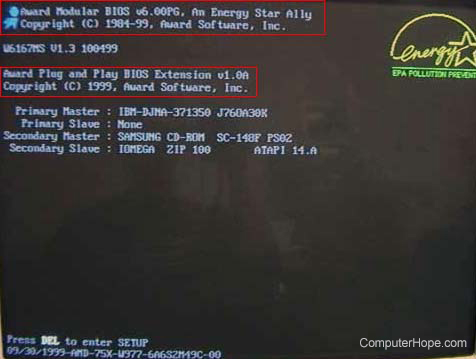
Also, information is displayed about what hard drive(s) and CD/DVD drives are installed in your computer.
On the boot screen, access the CMOS setup for more hardware.
To help with load times, or display a company logo, this screen may not be viewable. If this is the case, try the below alternate resolutions.
Through Windows System Information
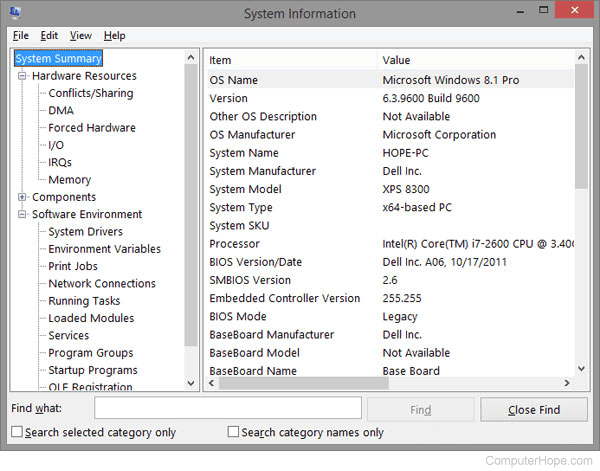
The BIOS information is also shown in the Windows System Information utility. To open this utility, click Start, Programs, Accessories, System Tools, and then System Information. If you're running Windows Vista or Windows 7, or Windows 10 type System Information (or msinfo32) in the Start search box.
The System Information window displays information about your computer, including the type of BIOS you have and the version, under the System Summary section. As seen in the picture below, this computer has a Dell BIOS version Dell Inc. A06, 10/17/2011.
Using the systeminfo command line command
Use the systeminfo command from the command line to view the BIOS version and other system information by following the steps below.
- Open the Windows command line.
- Type systeminfo and press Enter to get a screen similar to the example shown below.

You may need to scroll up to see the BIOS version.
In the Windows registry
BIOS information is available in the Windows registry. While in the registry, realize that improperly changing a setting can affect how Windows operates. So be careful if you choose to use this option to view your BIOS information.
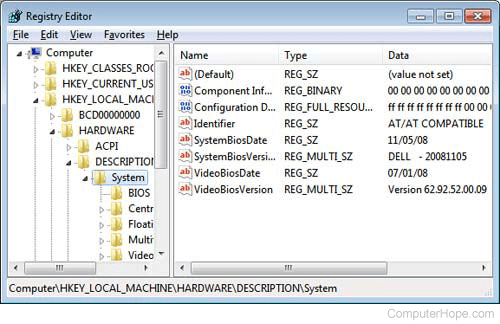
To access the registry, click Start and in the Run or Search box, type regedit in the text field and press Enter. In the Registry Editor, navigate to the below registry directory.
HKEY_LOCAL_MACHINE\HARDWARE\DESCRIPTION\System
Find the subkeys SystemBiosDate and SystemBiosVersion to see the BIOS and version for your motherboard. As seen in the picture below, the BIOS date and version are shown in these two keys.
Finding BIOS date through debug routine
Earlier computers without access to the above tools can also use the MS-DOS and Windows command line debug command to view the BIOS date, as shown below.
At the C:\> prompt, type the following commands.
debug
- d FFFF:5 L 8
After typing the above command, a string similar to the example below is shown.
FFFF:0000 30 34 2F-33 30 2F 39 38 4/30/98
The 4/30/98 would be the date of your computer BIOS.