
How to enable or disable mouse cursor trails

Sometimes, a mouse pointer leaves a fading copy of itself as it moves, known as a pointer trail. Enabling this accessibility feature makes it easier to locate the mouse pointer and track its movement. It is especially helpful to users who have impaired vision or a small computer monitor. To learn how to enable or disable cursor trails, select your operating system from the list below and follow the instructions.
Windows XP, Vista, 7, 8, 10, and 11
Microsoft Windows 2000 users need to install third-party software to enable mouse trails.
- Press the Windows key, type Control Panel, and press Enter.
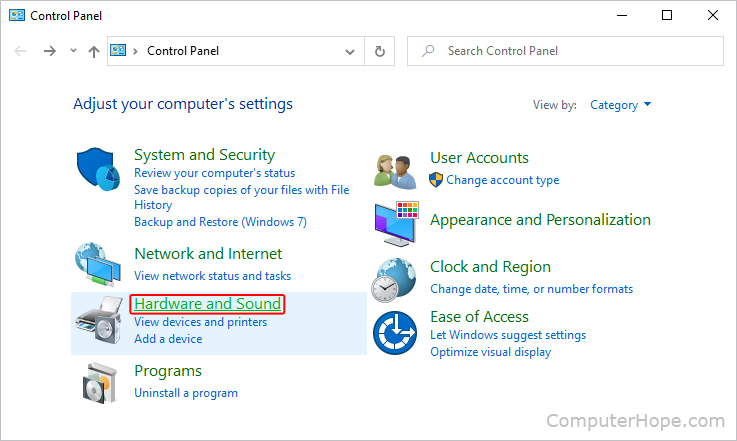
- In the Control Panel window, click Hardware and Sound.
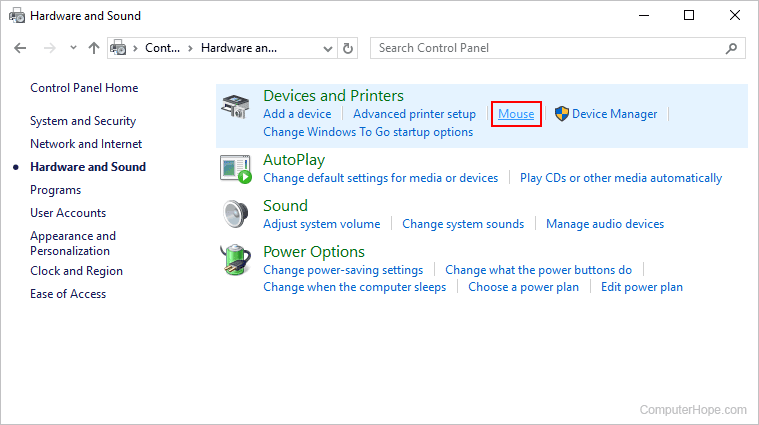
- On the Hardware and Sound screen, in the Devices and Printer section, click Mouse.
- In the Mouse Properties window, click the Pointer Options tab (A).
- Under Visibility, check or uncheck the box next to Show pointer trails or Display pointer trails to enable or disable them (B).
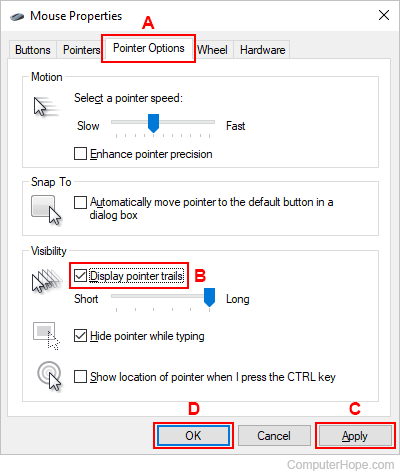
- When you're finished, click Apply (C), then OK (D).
If you want more mouse trail options, use MagicMouseTrails or 4ur-Windows-8-Mouse-Balls from the SoftwareOK program for different balls, shapes, and mouse pointer settings.
macOS
Unfortunately, Apple's macOS does not offer the option to enable or disable pointer trails. This feature may only be added when using third-party software. However, Apple has an Accessibility option in Display settings called Shake mouse pointer to locate, which temporarily increases the pointer size if the mouse is quickly moved back and forth. The pointer can also be resized permanently or recolored. To use these features, follow the steps in the macOS section of the following page.
Chromebook
Unfortunately, Chromebooks do not include an option to turn on mouse cursor trails. However, the mouse pointer can be enlarged, increasing its visibility, by following the steps in the Chromebook section of the following page.