
How to troubleshoot floppy disk drive issues
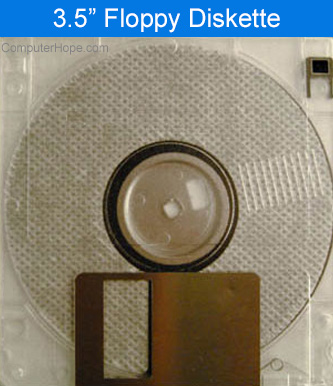
If you are experiencing issues with the floppy drive in your computer, review the troubleshooting options below to try and resolve the problem.
The troubleshooting options and details below are for floppy disk drive issues and not for issues about being unable to read one or two floppy disks. For floppy read errors see: Why can't my computer read a floppy diskette?
Bad floppy diskette
Verify the floppy diskette you are attempting to read from is not write protected or bad. Verify the diskette is not write protected by sliding the tab into the opposite position, preventing light from shining through it. If you do not have a tab, place tape over this hole.
Because of the technology of floppy diskette drives, the floppy diskettes ist most likely bad. Verify that other floppy diskettes are not exhibiting the same issue.
If other floppies work, you may have a bad floppy diskette.
Not setup in BIOS
Verify the floppy drive is properly configured in BIOS setup. If the floppy drive is not set up properly, you may experience read/write errors or the floppy may not work at all. Most computers need to have the floppy setup as a 3.5, 1.44 MB.
Eliminating possible conflicts with other hardware
If you have recently installed any new hardware, disconnect it temporarily to ensure that it's not causing the floppy drive not to work.
Not connected properly
- Power down, unplug, and open the computer, being aware of ESD (ElectroStatic Discharge) and its potential dangers.
- Verify the floppy connection is connected to the motherboard FDD (Floppy Disk Drive) connector. If it is connected, disconnect and reconnect the cable to verify the cable is seated properly.
- Verify the floppy cable coming from the motherboard is connected to the back of the floppy drive. If connected, disconnect and reconnect the floppy drive cable to verify it is seated properly.
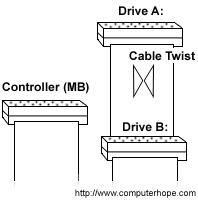
- Verify a power cable is connected to the back of the floppy drive.
- If your floppy cable has more than one connection, verify it's connected to the appropriate connection. The above picture illustrates where each drive is connected.
Bad drivers
If you are not able to read or write to a floppy diskette from Windows, verify the computer is not exhibiting floppy driver issues by testing the floppy drive from MS-DOS.
If you are running Windows 95, Windows 98, Windows Me, Windows NT, Windows 2000, or Windows 2000, click Start, Shutdown, and Restart the computer to an MS-DOS prompt.
If you are running Windows 3.x, click File and select Exit Windows to get to an MS-DOS prompt.
Once at the prompt, place a diskette into the floppy disk drive and type format a:.
If you receive any of the following errors when trying to format the floppy disk:
Invalid media or Track 0 Bad - Try formatting another floppy disk.
Write Protect Error - Ensure the disk is not write protected by removing the floppy disk and verifying you cannot see through both holes. If you see light, move the tab on the left side (when looking from the back) to the down position and try again. If the disk is not write protected, try another floppy disk.
Invalid drive specification - Verify the floppy drive is configured properly in BIOS setup.
If the floppy disk drive formats properly in MS-DOS but does not format in Windows, Windows or a program within Windows is preventing the floppy drive from working. End task all running TSRs and background programs. If you continue to experience the same issues, we recommend Windows be reinstalled.
Bad hardware
If you continue to experience issues after following the above steps, hardware in the computer is bad. Replace the following hardware in the computer in the below order.
- Replace the floppy data cable that connects the computer floppy drive to the motherboard.
- Replace the floppy drive if the floppy data cable did not resolve your issues.
- Replace or request that the motherboard be replaced.