
How to troubleshoot microphone issues
If you are experiencing issues with a microphone on your computer, review the troubleshootings options below for help on resolving the problem.
Not connected properly
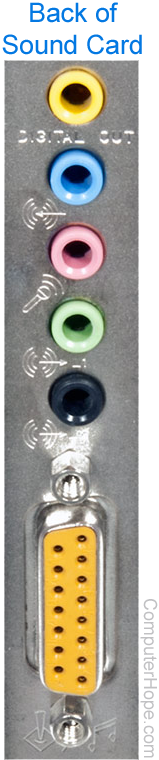
Verify the microphone is correctly connected to the computer. The microphone is usually connected to the back of the computer into the microphone jack. The microphone jack is often a pink connector and has a picture of a microphone next to it. The picture shows a sound card with a pink microphone connector, as an example.
Issues with microphone
If the microphone is correctly connected to the back of the computer, ensure you have a working microphone. Some older microphones may require a battery. If you have such a microphone, verify that it has a working battery.
After checking if your microphone uses a battery, verify the microphone works on another device, such as a stereo.
Sound drivers not set up properly
If the microphone is connected correctly and nothing is physically wrong with the microphone, verify the sound card is properly set up in your operating system.
Bad sound card
If you tried all the above troubleshooting steps and the microphone still doesn't work, the sound card should be replaced or the computer should be serviced.