
How to disable or enable screen savers
Updated: 12/29/2023 by Computer Hope

While screen savers are not entirely necessary anymore, many users prefer them to keep a computer secure while they're away or to view a slideshow of their favorite photos. This page shows you how to enable and disable the screen saver option in Microsoft Windows and macOS. To proceed, choose your operating system from the list below and follow the instructions.
Windows Vista, 7, 8, 10, and 11
- Press the Windows key, type Change screen saver, and press Enter.
- Under the Screen saver section, click the down arrow on the right side of the selection box (A).
- To enable, select a screen saver from the list. To disable, select None.
- When done, click Apply (B) and then OK (C).

Tip
You may adjust the time before the screen saver activates by changing the minutes value in the box next to Wait.

Windows XP
- Press Ctrl+D to minimize all open programs.
- Right-click an empty space on the desktop.
- Select Properties from the drop-down menu.
- Click the Screen Saver tab at the top of the window.
- Under the Screen saver section, click the down arrow on the right side of the selection box.
- To enable, select a screen saver from the list. To disable, select None.
- Once done, click Apply and then OK.
Tip
Adjust the time before the screen saver activates by changing the minutes value in the box next to Wait.
macOS Ventura and Sonoma
Here is how to enable and disable screen savers in macOS versions 13 and 14.
- At the top of the screen, on the far-left side of the menu bar, click the Apple icon.
- Select System Settings from the Apple menu.
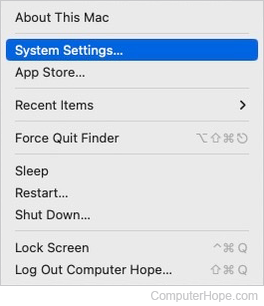
- In the sidebar, select Lock Screen. Then, click the arrow box next to Start Screen Saver when inactive.

- To enable the screen saver, pick any duration from the drop-down menu. To disable the screen saver, select Never.

macOS High Sierra, Mojave, Catalina, Big Sur, and Monterey
Here is how to enable and disable screen savers in macOS versions 10 through 12.
- In the menu bar, click the Apple icon to open the Apple menu, and select System Preferences.
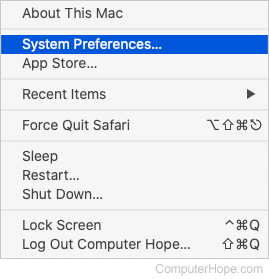
- Click the Desktop & Screen Saver icon in the System Preferences window.

- In the next window, click the Screen Saver tab near the top.
- Click the box next to Start after.

- In the drop-down menu, there are several options. If you choose a time, the screen saver is enabled, activating after the specified number. If you choose "Never," the screen saver is disabled.
