
How to associate a file with a program in Windows

By default, Windows selects a certain program to open each file type. However, you can re-associate a file extension to another program if you choose to do so. You can also change the default file association in Windows to open all files of a specific type or extension with the same program.
Select a link below for information on how to change the programs used to open files in Microsoft Windows.
Change file association for all files of a specific type
Select your version of Windows from the list below and follow the steps to change the association for all files of specific extensions (e.g., .txt, .jpg, .png, etc.).
Windows 11
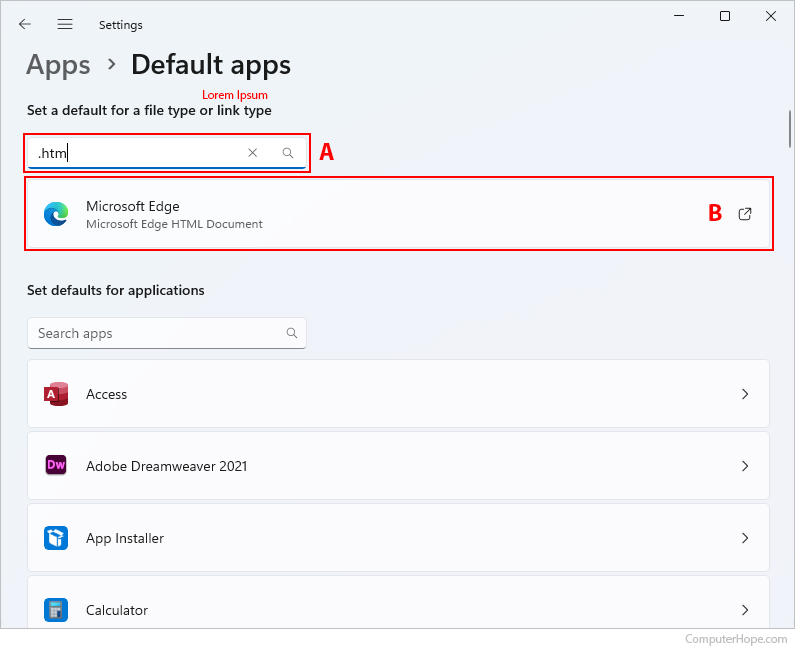
- Press the Windows key, type Default apps, and press Enter.
- In the Enter a file type or link type field, search for the extension whose association you'd like to change (A). For our example, we're using files with the ".htm" file extension.
- Click the currently-associated program (B).
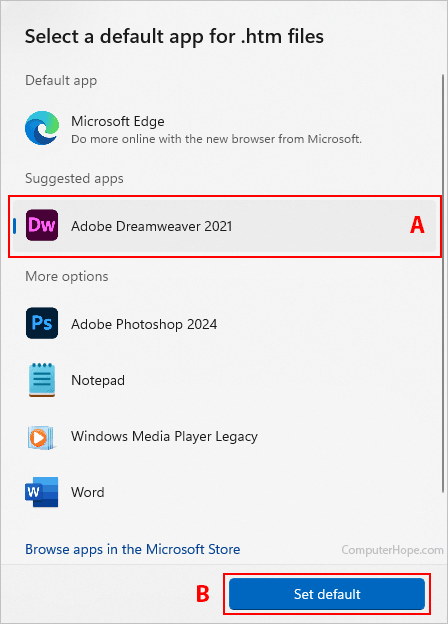
- Click the program you want to associate the file type with (A), and then click the Set default button (B).
Windows 10
- Press the Windows key, type Default apps, and press the Enter key.
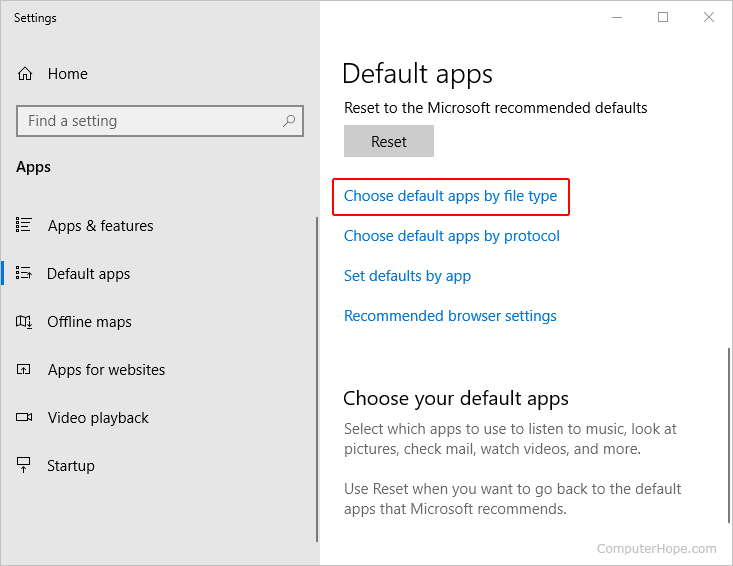
- On the right side, in the Default apps section, scroll down and click the Choose default apps by file type option.
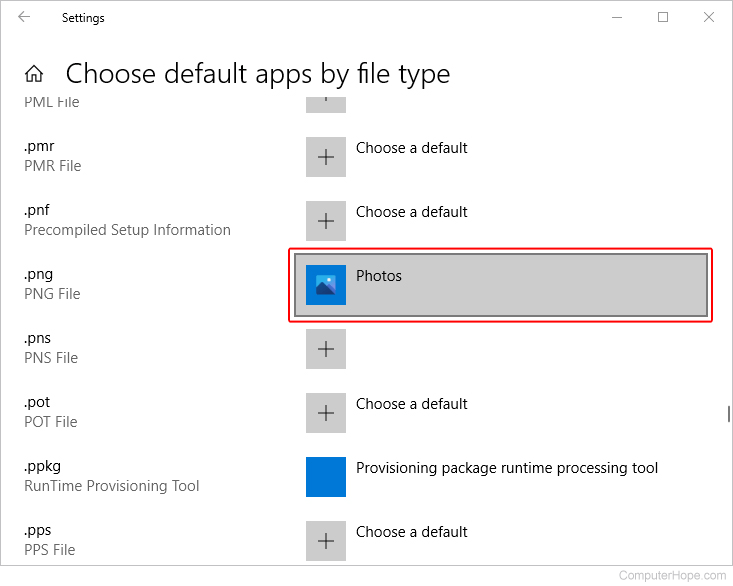
- Under the Name column, locate the file extension you want to modify.
- Under the Default app column, click the name of the currently-selected default program.
- In the Choose an app pop-up window, select the program you want to associate with that file type.

Windows Vista, 7, and 8
- Open the Control Panel.
- In Control Panel, type Default Programs in the search field in the upper-right corner and click the Default Programs selector.

- Click the Associate a file type or protocol with a program option.

Modify the actions of a file type
- Locate the file extension you want to modify and highlight it.
- Click the Change program button.
- Select the program you want to associate, open the file extension, and click OK. If the program you want to select is not listed, click the Browse button, find the program's executable (.exe) file on the computer, and click OK to select that program.
Windows 2000 and XP
- Open My Computer or Explorer.
- Click the Tools in the file menu and then Folder Options.
- Click the File types tab.
Adding a new file type
- Click the New button.
- Type the name of the file extension.
- Click OK.
Modify the actions of a file type
- Locate the file extension you want to modify and highlight it.
- Click the Advanced button.
- To modify a previous action, highlight it in the Actions list and edit it. Otherwise, click New and create a new action.
Removing a file type
- Locate the file extension you want to remove and highlight it.
- Click the Delete button.
Windows 95, 98, and Me
- Open My Computer or Explorer.
- Click View in the file menu and Folder Options.
- Click the File types tab.
Adding a new file type
- Click the New type button.
- Type the associated extension and the description and actions of the file.
Modifying the actions of a file type
- Locate the file extension you want to modify and highlight it.
- Click the Edit button.
- To modify a previous action, highlight it in the Actions list and edit it. Otherwise, click New and create a new action.
Removing a file type
- Locate the file extension you want to remove and highlight it.
- Click the Remove button.
Associate one file with a specific program
To change the program associated with a specific file, follow the steps below.
- Locate the file whose association you want to change or set.
You can use the keyboard shortcut Windows key+E to open Explorer if you're unsure where the file is.
- Right-click the file you want to change the file association and select Properties in the drop-down menu.
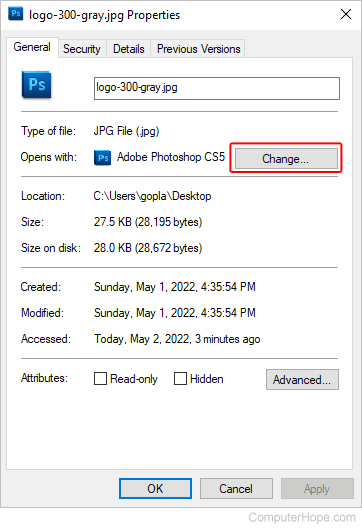
- In the file Properties, click the Change button next to the "Opens with" option.
- After clicking Change, you are given a list of programs that can open the file. Select the program you want to use and click OK.
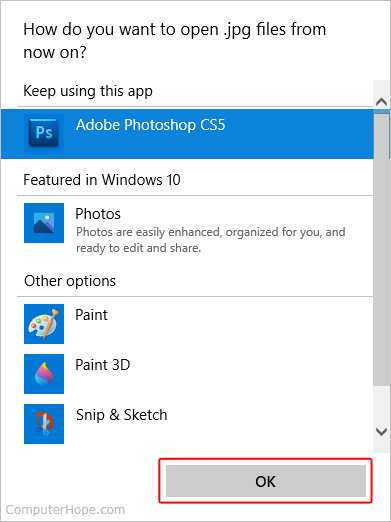
If the program you want to use isn't listed, click More apps at the bottom of the window. If you still don't see your program of choice, you can locate it manually by clicking Look for another app on this PC.