
How to get letters with accent marks in Microsoft Word

Letters with accent marks may created in Microsoft Word using various methods, many of which are listed below. These steps help those who do not have specialized keyboards. To proceed, select from the list or check out each section in order.
Inserting accented letters with the menu bar or Ribbon
The steps in this section only work with certain versions of Word. If you cannot insert accent marks with these steps, see the section on Alt codes.
- Open Microsoft Word.
- Select the Insert tab on the Ribbon or click Insert in the menu bar.
- On the Insert tab or the Insert drop-down, select the Symbol option.

- Select the desired accented character. Scroll through the entire list or select from the Subset drop-down list to view a specific type. In Microsoft Word Online, click More Symbols to see additional options.
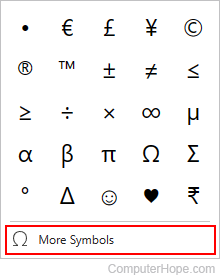
- After selecting the desired accented letter or symbol, click the Insert button.
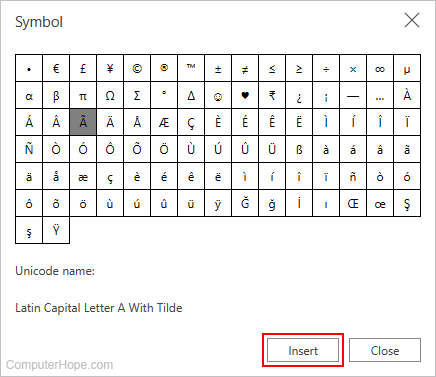
Once you've inserted an accented character, you may copy and paste it anywhere in the worksheet.
Using keyboard shortcuts
Microsoft Word users can also utilize the following combinations of keys to add accent marks to their letters. For example, to get the à character, press Ctrl, and press ` (the tilde key). Then, release both keys and quickly press A.
Microsoft Word Online (the web version) does not support the ability to add accented letters using keyboard shortcuts.
You must press the letter key quickly after releasing the keyboard shortcuts. Otherwise, the non-accented version of the letter is created.
To get uppercase accent letters, turn on Caps Lock before using the keyboard shortcuts. Alternatively, after pressing the keyboard shortcuts together, release all but Shift, and press the desired letter to create an uppercase accent letter. This Shift option only works for those shortcuts utilizing Shift, as listed below.
| Desired Symbol | Keyboard Shortcut |
|---|---|
| à, è, ì, ò, ù, À, È, Ì, Ò, Ù | Ctrl+` (accent grave), the letter |
| á, é, í, ó, ú, ý, Á, É, Í, Ó, Ú, Ý | Ctrl+' (apostrophe), the letter |
| â, ê, î, ô, û, Â, Ê, Î, Ô, Û | Ctrl+Shift+^ (caret), the letter |
| ã, ñ, õ, Ã, Ñ, Õ | Ctrl+Shift+~ (tilde), the letter |
| ä, ë, ï, ö, ü, ÿ, Ä, Ë, Ï, Ö, Ü, Ÿ | Ctrl+Shift+: (colon), the letter |
| å, Å | Ctrl+Shift+@ (At), a or A |
| æ, Æ | Ctrl+Shift+& (ampersand), a or A |
| œ, Œ | Ctrl+Shift+& (ampersand), o or O |
| ç, Ç | Ctrl+, (comma), c or C |
| ð, Ð | Ctrl+' (apostrophe), d or D |
| ø, Ø | Ctrl+/, o or O |
| ¿ | Alt+Ctrl+Shift+? |
| ¡ | Alt+Ctrl+Shift+! |
| ß | Ctrl+Shift+&, s |
Using Alt Codes
If you can't find the accented letters you're looking for in the menus or by utilizing keyboard shortcuts, try using Alt codes.
- Open Microsoft Word.
- Click an area in the document where you want to insert a character with an accent mark.
- Press either Alt key, type the appropriate number sequence (shown in the table below) on the numeric keypad, and release Alt. For example, to get an accented "a" with an acute accent, you'd press Alt+0225.
All numbers in an Alt code must be entered and typed on the numeric keypad.
Table of common Alt codes for accented letters
| Accented Letter | Alt Code | Name or meaning |
|---|---|---|
| á | 0225 | Lowercase "a" with an acute accent. |
| Á | 0193 | Uppercase "A" with an acute accent. |
| à | 0224 | Lowercase "a" with a grave accent. |
| À | 0192 | Uppercase "A" with a grave accent. |
| â | 0226 | Lowercase "a" with a circumflex. |
| Â | 0194 | Uppercase "A" with a circumflex. |
| å | 0229 | Lowercase "a" with a ring. |
| Å | 0197 | Uppercase "A" with a ring. |
| ã | 0227 | Lowercase "a" with a tilde. |
| Ã | 0195 | Uppercase "A" with a tilde. |
| ä | 0228 | Lowercase "a" with a diaeresis/umlaut. |
| Ä | 0196 | Uppercase "A" with a diaeresis/umlaut. |
| ā | 0257 | Lowercase "a" with the line (macron). |
| Ā | 0256 | Uppercase "A" with the line (macron). |
| æ | 0230 | Lowercase "ae" ligature. |
| Æ | 0198 | Uppercase "AE" ligature. |
| ç | 0231 | Lowercase "c" with a cedilla. |
| Ç | 0199 | Uppercase "C" with a cedilla. |
| č | 0269 | Lowercase Latin C with a caron. |
| Č | 0268 | Uppercase Latin C with a caron. |
| é | 0233 | Lowercase "e" with an acute accent. |
| É | 0201 | Uppercase "E" with an acute accent. |
| è | 0232 | Lowercase "e" with a grave accent. |
| È | 0200 | Uppercase "E" with a grave accent. |
| ê | 0234 | Lowercase "e" with a circumflex. |
| Ê | 0202 | Uppercase "E" with a circumflex. |
| ë | 0235 | Lowercase "e" with a diaeresis/umlaut. |
| Ë | 0203 | Uppercase "E" with a diaeresis/umlaut. |
| í | 0237 | Lowercase "i" with an acute accent. |
| Í | 0205 | Uppercase "I" with an acute accent. |
| ì | 0236 | Lowercase "i" with a grave accent. |
| Ì | 0204 | Uppercase "I" with a grave accent. |
| î | 0238 | Lowercase "i" with a circumflex. |
| Î | 0206 | Uppercase "I" with a circumflex. |
| ï | 0239 | Lowercase "i" with a diaeresis/umlaut. |
| Ï | 0207 | Uppercase "I" with a diaeresis/umlaut. |
| ī | 0299 | Lowercase "i" with the line (macron). |
| Ī | 0298 | Uppercase "I" with the line (macron). |
| ñ | 0241 | Lowercase "n" with a tilde. |
| Ñ | 0209 | Uppercase "N" with a tilde. |
| ó | 0243 | Lowercase "o" with an acute accent. |
| Ó | 0211 | Uppercase "O" with an acute accent. |
| ò | 0242 | Lowercase "o" with a grave accent. |
| Ò | 0210 | Uppercase "O" with a grave accent. |
| ô | 0244 | Lowercase "o" with a circumflex. |
| Ô | 0212 | Uppercase "O" with a circumflex. |
| ø | 0248 | Lowercase "o" with a slash. |
| Ø | 0216 | Uppercase "O" with a slash. |
| õ | 0245 | Lowercase "o" with a tilde. |
| Õ | 0213 | Uppercase "O" with a tilde. |
| ö | 0246 | Lowercase "o" with a diaeresis/umlaut. |
| ő | 0337 | Lowercase "o" with double acute accents. |
| Ö | 0214 | Uppercase "O" with a diaeresis/umlaut. |
| ð | 0240 | Latin small letter eth. |
| ß | 0223 | Ess-tsett. |
| ř | 0345 | Lowercase "r" with a caron. |
| š | 0353 | Lowercase "s" with a caron. |
| Š | 0352 | Uppercase "s" with a caron. |
| ú | 0250 | Lowercase "u" with an acute accent. |
| Ú | 0218 | Uppercase "U" with an acute accent. |
| ù | 0249 | Lowercase "u" with a grave accent. |
| Ù | 0217 | Uppercase "U" with a grave accent. |
| û | 0251 | Lowercase "u" with a circumflex. |
| Û | 0219 | Uppercase "U" with a circumflex. |
| ü | 0252 | Lowercase "u" with a diaeresis/umlaut. |
| Ü | 0220 | Uppercase "U" with a diaeresis/umlaut. |
| ū | 0363 | Lowercase "u" with a line (macron). |
| Ū | 0362 | Uppercase "U" with a line (macron). |
| ÿ | 0255 | Lowercase "y" with diaeresis/umlaut. |
Using a third-party program
For third-party software capable of inserting accented characters, see: How to insert accent marks and special characters.