
Ribbon
A ribbon may refer to any of the following:
1. With impact printing, a ribbon is a device used to transfer ink to paper. Ribbons are found on devices such as typewriters and stenotype machines.
2. With a cable, a ribbon describes the IDE (integrated drive electronics) cable.
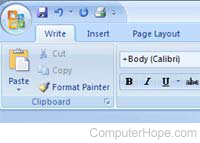
3. With Microsoft Office programs such as Microsoft Word and Excel, the Ribbon feature replaces the traditional file menu and toolbar. As shown in the image, the Ribbon dynamically changes based on what the user is currently doing. In this example, the Ribbon for "Write" is displayed and has grouped all writing-related activities.
Additional Ribbon examples
Below is an updated version of the Ribbon introduced with Office 2010 and how the Ribbon appears in Microsoft Word.
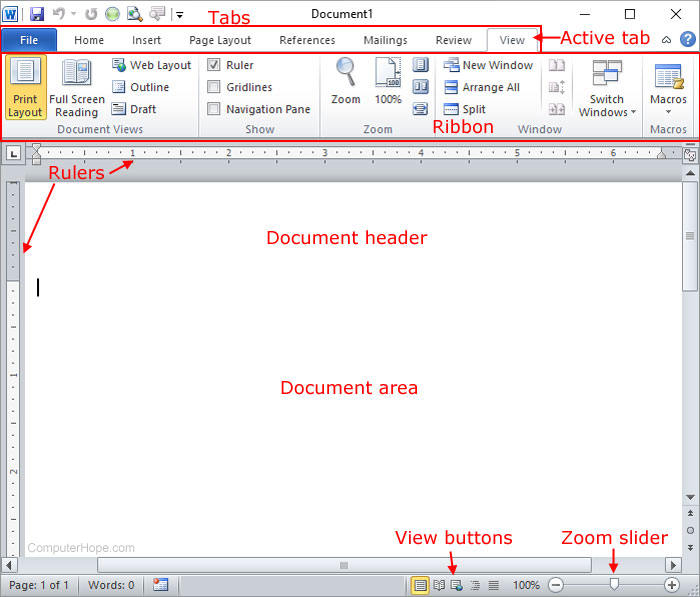
As mentioned, the Ribbon changes depending on what you're doing in Word, Excel, or another Office program. For example, if you're working with images, the Ribbon displays all the available modifications that can be performed on them.
How do I hide the Ribbon?
- Click the small down arrow at the top of the window next to the printer icon in the above example. If a printer icon is not displayed, it would be next to the Undo or Redo (blue) arrow icon.
- In the menu, select Minimize the Ribbon.
If there is no Minimize the Ribbon option in that menu, look for an Up arrow underneath the red X in the upper-right corner. Clicking the Up arrow, titled "Minimize the Ribbon," hides the Ribbon. When the Ribbon is hidden, the up arrow changes to a down arrow, and clicking it displays the Ribbon again.
Pressing Ctrl+F1 on the keyboard is a shortcut for hiding and showing the Ribbon.
How to customize the Ribbon
The Ribbon can be customized by right-clicking anywhere on the Ribbon and choosing the Customize the Ribbon option. Once in the Customize Ribbon window, you can add and remove any option shown in the Ribbon, change the display order, and customize the keyboard shortcuts.
How to use keyboard shortcuts with the Ribbon
To view available keyboard shortcuts in Microsoft Office programs, press the Alt to show the keytip. Once pressed, each option in the ribbon is shown with a letter(s) or number next to them. Pressing that letter or number activates that option in the Ribbon. For example, press Alt+H to access the Home tab. Once in the Home tab, each option has its corresponding key next to them, as shown in the following picture.

If you're already in the tab, press the Alt to show the options.
Ribbon tab shortcuts
Below lists the keyboard shortcuts to open each Ribbon tab in Microsoft Word.
- File = Alt+F
- Home = Alt+H
- Insert = Alt+N
- Page Layout = Alt+P
- References = Alt+S
- Mailings = Alt+M
- Review = Alt+R
- View = Alt+W
- Acrobat = Alt+B
Below lists keyboard shortcuts to open each Ribbon tab in Microsoft Excel.
- File = Alt+F
- Home = Alt+H
- Insert = Alt+N
- Page Layout = Alt+P
- Formulas = Alt+M
- Data = Alt+A
- Review = Alt+R
- View = Alt+W
- Developer = Alt+L
- Acrobat = Alt+B
Below lists keyboard shortcuts to open each Ribbon tab in Microsoft PowerPoint.