
How to change the font size in my browser
Adjusting the size of objects in your browser can make them easier to view or read. To change the font size, we recommend using the zoom function as changes are quick and easy to edit or revert. It also works with all types of content. The following sections show you how to quickly adjust the size of both font and images on a page or only the font. To proceed, select your browser from the list below and follow the instructions.
When following the steps below, you are zooming in on the page rather than changing the font size chosen by the page's creator. As a result, the font size and type remain at their default values when you print a document or page from the Internet.
Using any of the browsers listed below, you can change the size of the font using your keyboard and mouse. Press and hold Ctrl, then move the mouse wheel up or down. Alternatively, press and hold Ctrl (or Command on Mac), then press + or - (plus or minus) to increase and decrease the font size.
All major browsers also support pressing Ctrl+0 (zero) to change the font to its default size.
Google Chrome

To change the font size in Chrome, use one of the following methods.
Change font and image size
- Open the Chrome browser.
- Click the Customize and control Google Chrome icon in the upper-right corner of the browser window.
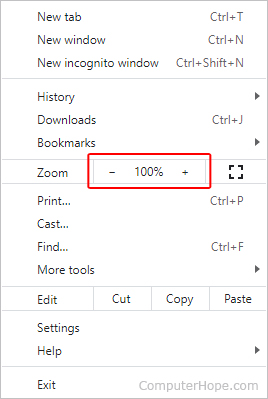
- Near the top of the drop-down menu, you can use the + (plus) or - (minus) in the Zoom section of the menu to increase or decrease the font size. Chrome's default zoom setting is 100%.
Change font size only
- Open the Chrome browser.
- Click the Customize and control Google Chrome icon in the upper-right corner of the browser window.
- Select Settings from the menu.
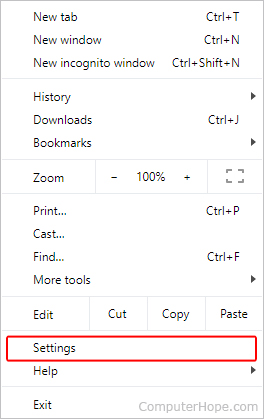
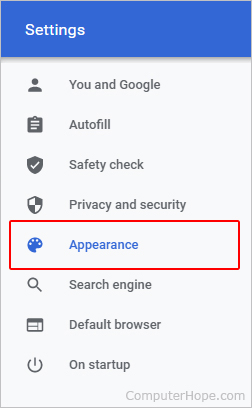
- In the left navigation menu, click the Appearance option.
- In the Settings window, click the drop-down menu in the Font size entry under the Appearance section.
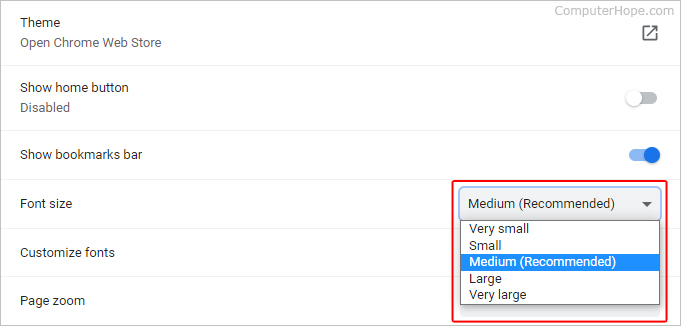
- Select the desired font size to set as default. The options are Very small, Small, Medium, Large, and Very large.
Using the Customize fonts selector, Chrome lets you change the browser's default font and font size. However, the settings only work if the page's creator has not specified them already.
Chrome also supports the tip mentioned at the beginning of this page to change the font size.
Mozilla Firefox

To change the font size in Firefox, use one of the following methods.
Change font and image size
- Open the Firefox browser.
- Click the Menu icon in the top-right corner of the screen.
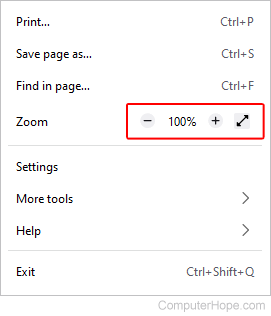
- In the upper part of the drop-down menu, you may increase or decrease the font size by clicking the + (plus) or - (minus) in the Zoom section. The browser's default zoom setting is 100%.
Change font size only
- Open the Firefox browser.
- Click the Menu in the top-right corner of the screen.
- Select Settings from the drop-down menu.
- Click General in the left navigation pane.
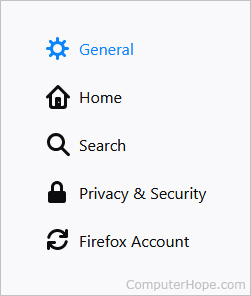
- Scroll down to the Language and Appearance section. Under Zoom, you can change the size of the text relative to the rest of the page by checking the Zoom text only box and adjusting the zoom percentage.
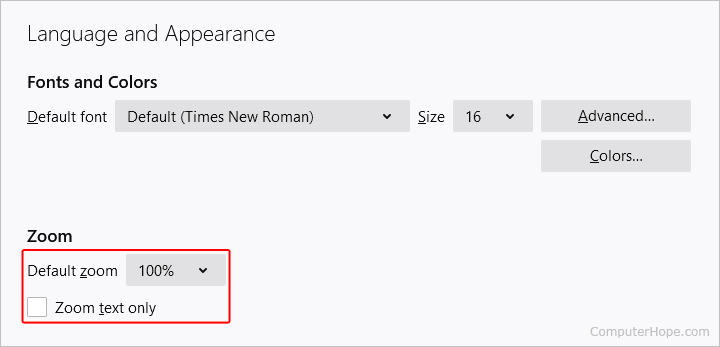
Mozilla Firefox lets you change the browser's default font and font size. However, the settings only work if the page's creator has not specified them already.
Mozilla Firefox also supports the tip mentioned at the beginning of this page to change the font size.
Microsoft Edge

To change the font size in Edge, use one of the following methods.
Change font and image size
- Open the Microsoft Edge browser.
- Click More (three horizontal dots) in the window's upper-right corner.
- Increase or decrease the font size by clicking the + (plus) or - (minus) in the Zoom section of the menu (near the top). The browser's default zoom setting is 100%.

Change font size only
- Open the Microsoft Edge browser.
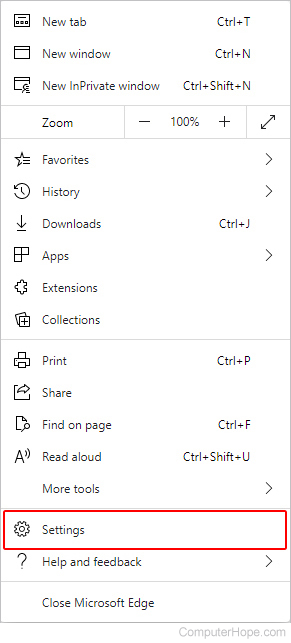
- Click More (three horizontal dots) in the window's upper-right corner.
- Select Settings from the drop-down menu.
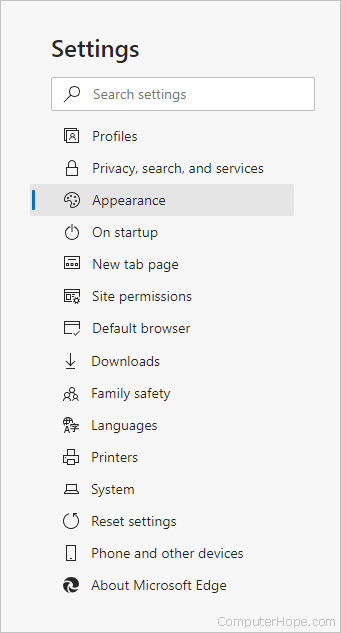
- On the left side of the Settings window, click the Appearance selector.
- Within the right window, scroll down to the Fonts section. Then, click the drop-down box to the right of Font size and choose the option that works best for you.
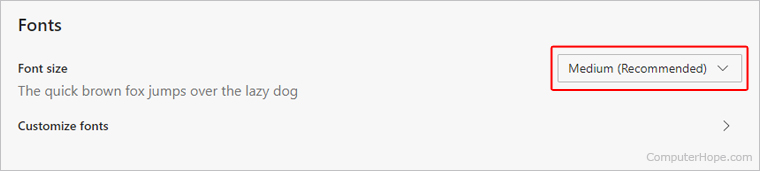
In Edge, click the Customize fonts selector to change the browser's default font and font size. However, the settings only work if the page's creator has not specified them already.
Microsoft Edge also supports the tip mentioned at the beginning of this page to change the font size.
Internet Explorer

To change the font size in Internet Explorer, follow the steps below.
- Open the Internet Explorer browser.
- Click Tools in the upper-right corner.
- Move your mouse over Zoom in the drop-down menu.
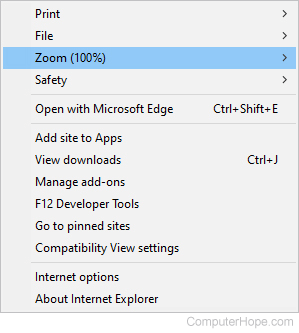
- Choose a zoom setting from the expanded menu to change the text size.
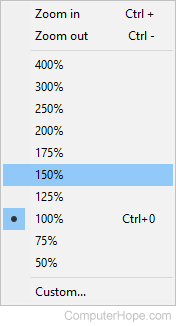
Internet Explorer also supports the tip mentioned at the beginning of this page to change the font size.
Opera

To change the font size in Opera, use one of the following methods.
Change font and image size
- Open the Opera browser.
- Click the Opera
 icon in the upper-left corner of the browser window.
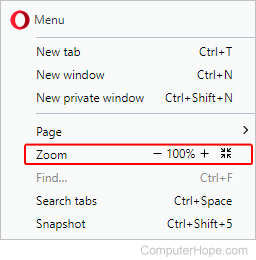
 - Increase or decrease the font size by clicking the + (plus) or - (minus) in the Zoom section of the menu. Opera's default zoom setting is 100%.
Change font size only
- Open the Opera browser.
- Click the Opera icon in the upper-left corner of the browser window.
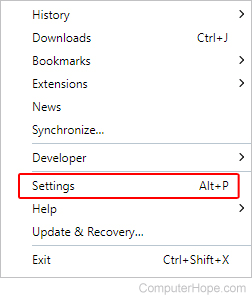
- Select Settings in the menu.
- In the Settings window, scroll down to the Appearance section.
- Under Appearance, click the drop-down menu for the Font size entry.
- Select the desired font size to set as the default. The options are Very small, Small, Medium, Large, and Very large.
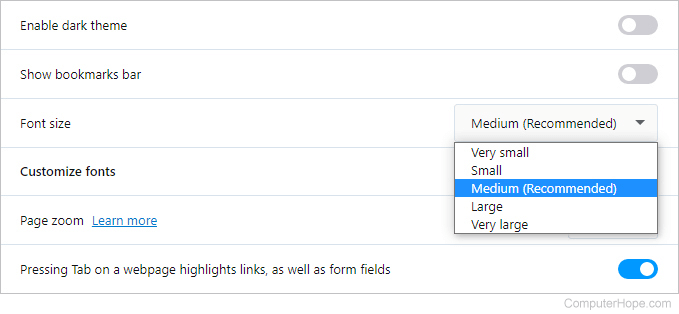
Using the Customize fonts selector, Opera lets you change the browser's default font and font size. However, the settings only work if the page's creator has not specified them already.
Opera also supports the tip mentioned at the beginning of this page to change the font size.
Safari for macOS
This section shows you how to increase the font size when using Safari on a desktop (iMac) or laptop (MacBook) computer.
- Open the Safari browser.
- In the Apple menu bar at the top of the screen, click the
 selector.
 - On the drop-down menu, either click Zoom In or Zoom Out to adjust the font size.
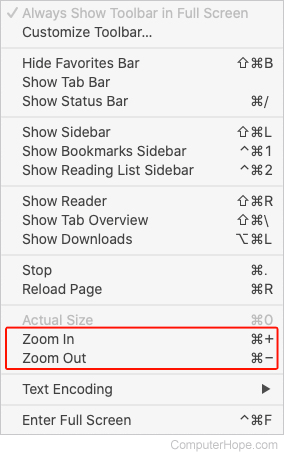
Press and hold the Command++ (plus) or - (minus) key to increase or decrease the font size.
Mobile device

On a mobile device, you can pinch and zoom with two fingers to zoom in on any text that is hard to read.
To increase the size of text everywhere on the device, you can increase the font size in the Settings app.
iPhone or iPad
- Open the Settings app.
- Select Accessibility > Larger text.
Android mobile device
- Open the Settings app.
- Select Accessibility > Text and display > Font size.
Some Android phones may have the font size settings in a slightly different location or under a different setting name, depending on the device manufacturer.