
Font
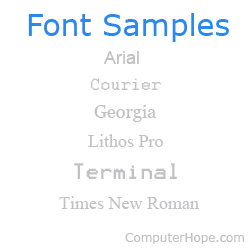
A font is a graphical representation of text that may include a different typeface, point size, weight, color, or design. The image shows examples of different computer fonts. Software programs like Microsoft Word, Microsoft Excel, and WordPad allow users to change the font when typing text in a document or spreadsheet.
While some users refer to fonts and typefaces interchangeably, it's more accurate to think of a typeface as a group of cohesive letterforms. A font is how the typeface is presented, considering the size and style. A group of fonts including bold and italic variations is known as a font family.
Those using Microsoft Windows can find all the fonts installed on their computer by browsing to the C:\Windows\Fonts or C:\Winnt\Fonts directory.
Examples of fonts
There are thousands of available fonts that can be installed and used on a computer. Below are some fonts and examples of how they may appear if accessible to your computer and browser.
- Arial (Example of Arial)
- Cursive (Example of Cursive)
- Helvetica (Example of Helvetica)
- Impact (Example of Impact)
- Monospace (Example of Monospace)
- Times New Roman (Example of Times New Roman)
- Veronica (Example of Veronica)
- Verdana (Example of Verdana)
- Wingdings (Example of Wingdings)
Why are fonts used?
Different fonts are utilized to add style to a web page or document. That is to say, they can set or match the "tone" of the text based on the content. Additionally, specific fonts affect readability depending on the medium.
What is the font window?
The font window shows the current font settings of selected text or the current font settings. For example, below is an example of the Font window shown in Microsoft Word.
In Microsoft Word, press the keyboard shortcut Ctrl+D to open the font window.
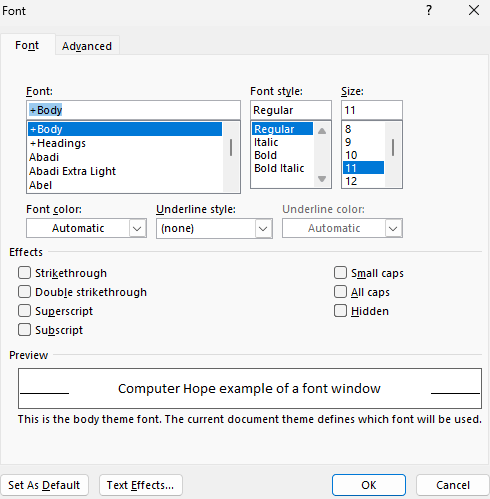
In this font window example, there are the following sections.
- Font - The installed font being used. In this example, "+Body" indicates that Word uses the font selected in the body style.
- Font style - The font's appearance, which can be regular, italic, bold, or bold italic.
- Size - The size is the point size of the font.
- Font color - The color of the font text.
- Underline style - How the underline appears. Options included underlining words only, which doesn't underline any spaces or other characters. Other options include dots, dashes, wavy lines, etc.
- Underline color - If an underline is being used, allows the line color to be changed.
- Effects - Additional font effects that can be added to the font. In this section, checking any of the effects boxes adds the effect. For further information about these effects see our strikethrough, small caps, double strikethrough, all caps, superscript, hidden, and subscript pages.
- Preview - The Preview section shows you an example of the highlighted text with any settings of effects enabled.
- Set as default - The Set As Default button takes all the font settings in the window and makes those settings the default font. In other words, if you want Times New Roman, select it in the font and click this button to make it the default.
- Text effects - Opens the text effects settings.
Default fonts and font sizes
Software that uses fonts, like a word processor or spreadsheet, is set with a default font and font size when used. Below are the default fonts and font sizes for popular software and online services.
In Microsoft Word the default font can be changed in the font window, mentioned above.
| Software | Font | Font size |
|---|---|---|
| Google Doc | Arial | 11 |
| Google Sheet | Arial | 10 |
| Google Gmail | Sans Serif | Normal |
| Microsoft Excel | Calibri | 11 |
| Microsoft PowerPoint | Calibri | 24 |
| Microsoft Word | Calibri | 11 |
| Notepad | Consolas | 11 |
| OpenOffice Calc | Arial | 10 |
| OpenOffice Writer | Times New Roman | 12 |
| WordPad | Calibri | 11 |
Basefont, Bitmap font, Code 128, <font>, Font editor, Google font, HTML font, Internal font, MICR, Outline font, Printer font, Redlining, Roman, Scalable font, Symbol font, System font, Text Effects, TrueType, Type 1 font, Typography terms, UDF, WordArt, Word processor terms