
Should my computer fans be sucking or blowing?
Heat sink and CPU fan
A heat sink on the processor or another internal cooling unit can suck or blow depending on the heat sink and configuration of the computer's internal components. A heat sink that is both active and passive blows air through the finned radiator to help the heat escape faster.
Case fans
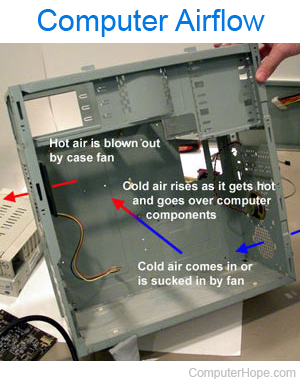
Your chassis configuration determines whether or not the fans should be blowing or sucking. Computer cases that have only one fan in the back should always be blowing the hot air out. A typical configuration is a back fan blowing air out, with a fan in the front sucking in cool air.
In the picture, the computer case sucks in cold air from the front to cool the internal components, and as the lighter hot air rises, it's eventually blown out the back. Remember when working with a computer with more than one case fan, at least one should be sucking air in, and one should be blowing air out. Having all fans blowing in with cool air would give the hot air no way to escape.
If the computer power supply has an intake fan and a fan that blows hot air out the back, a back computer case fan may not be necessary.
Related questions
Should fans mounted on the top of the case suck air in or blow air out?
Because hot air rises, if you're building a computer with additional fans on the top, those fans should blow hot air out of the case.
How should side case fans be mounted?
If you are building a computer and mounting fans on the side of the case, we suggest that they be blowing air into the computer.