
How to align text in Microsoft Word, Writer, and Google Docs

Below are the steps to change or move the alignment of text in a word processor and most text editing programs. View the steps for the program you are using by clicking one of the links below.
Align text in Microsoft Word
The steps below are for changing the alignment of text in Microsoft Word. They can also be used to align text in a column or row for Microsoft Excel and most other text programs.
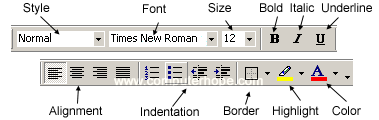
To change the horizontal alignment of text in Word, highlight the text you want to change and click the left, center, or right alignment icons, as shown in the image. In all new versions of Microsoft Word, the alignment options are found under the Home tab.
or
Press one of the keyboard shortcuts to adjust the alignment of any highlighted text. For left alignment, highlight the text and press Ctrl+L to align text to the left margin. For center alignment, highlight the text and press Ctrl+E. For right alignment, highlight the text and press Ctrl+R to align text to the right.
Adjusting the vertical alignment
To change the vertical alignment of text, follow the steps below.
Vertical alignment settings are only available in the Microsoft Word desktop application. It is not possible to change the vertical alignment of text in Microsoft Word Online (the web version).
- Open Microsoft Word.
- Click the Layout tab in the Ribbon.
- In the Page Setup section, click the dialog box launcher in the lower-right corner.

- In the Page Setup window, click the Layout tab.
- In the Page section, click the drop-down menu next to Vertical alignment (A).
- Select Top, Center, Justified, or Bottom.
- If you do not want this setting to affect the whole document, click the Apply to drop-down menu (B).
- If you highlighted text in the document to change the vertical alignment, choose the Selected text option. If you did not highlight any text, choose the This point forward option.
- Click OK when done changing the alignment settings.

Align text in WordPad
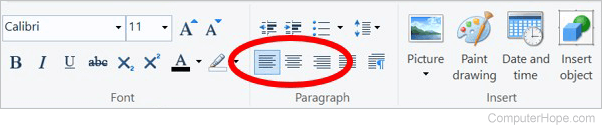
To change the horizontal alignment of text in WordPad, highlight the text and click the left, center, or right alignment icons in the Paragraph section of the menu bar.
If you're working with a .txt file or save the file as a .txt file, all formatting is lost, including any alignment. To align text in a .txt file, edit the file, and then use the Save As option to save it as a .rtf, .docx, or .odt.
Align text in Google Docs

In Google Docs, click one of the alignment options (left, center, right) in the top center of the toolbar.
or
Press one of the keyboard shortcuts to adjust the alignment of any highlighted text.
- For left alignment, highlight the text and press Ctrl+Shift+L.
- For center alignment, highlight the text and press Ctrl+Shift+E.
- For right alignment, highlight the text and press Ctrl+Shift+R.
or
- Open Google Docs.
- Highlight the text you want to align.
- Click Format, Align, and then choose an alignment.
Align text in OpenOffice Writer
To change the horizontal alignment of the text in OpenOffice Writer, highlight the text you want to change and click the left, center, or right icons on the toolbar. These icons look similar to those shown in the above example picture of the Microsoft Word.
How to change the vertical alignment
OpenOffice Writer does not have a feature like Microsoft Word that lets you vertically align text. However, this can still be done using frames. To do this, follow the steps listed below.
- Open OpenOffice Writer.
- Click Insert.
- Click Frame.
- In the Frame window under type, change the horizontal and vertical position to center and both to "Entire page."
- Because the frame has borders, unless you want to keep these borders, click the borders tab and click None under Style.
- Once done, you have a frame in the center of your page to enter any text and have it centered.
Align text in Apple Pages
To change the horizontal alignment of the text in Apple Pages, highlight the text you want to change and click the left, center, or right icons on the Format panel. If you do not see the Format panel open, select View, Inspector, Format. These icons look similar to those shown in the above example picture of the Microsoft Word.
How to change the vertical alignment
Text in table cells and text objects can be vertically aligned. To do this, follow the steps below.
- Open Pages.
- On the menu, click Insert.
- Click Text Box or Table.
- Highlight the text.
- In the Format panel, additional vertical alignment buttons appear under the left, right, and center buttons.