
Monitoring network upload and download data transferred
This page is for users looking to monitor the bandwidth on their computer. If you have other computers or devices (DVR, Internet radio, wireless connections, etc.) connected to your network they're not monitored. Finally, realize these utilities monitor all network adapter bandwidth, which means if you transfer files over your local network that traffic is monitored as well. If you are looking for more than a software solution for monitoring your computer's network adapter skip to the other solutions.
Microsoft Windows
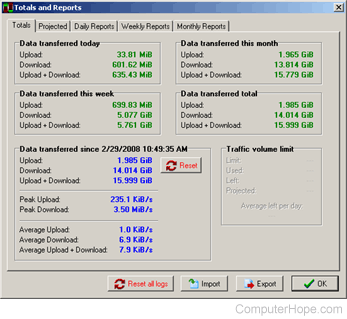
There are different software solutions to help monitor and list the total data transferred over your computer. However, we highly recommend NetMeter, a great free utility that runs in the background and can keep track of your upload and download data transfers.
In the picture, NetMeters Totals and Reports screen lists the upload and download transfer totals for the day, week, and month and peaks and averages. NetMeter can be downloaded here.
Other great Windows bandwidth monitor utilities
- NetWorx - Fantastic free software utility for monitoring all your computer's Internet bandwidth. NetWorx offers the ability to set quotas, create notifications, display data in graphs, has network utilities like a GUI (graphical user interface) netstat, and more.
- AnalogX NetStat - Another great utility with a slick interface to monitor your incoming and outgoing network adapter traffic.
- Net Meter - Great program that lets you try for free before buying it. Net Meter can display total bandwidth by day, week, and month, can notify you by sound or e-mail or even run a program if a certain quota of bandwidth is met, and more.
- FreeMeter - Another great small and lightweight application to monitor your computer's network bandwidth.
- WhatPulse - Excellent way to monitor your network traffic and other stats like computer uptime and keyboard key presses, and mouse clicks.
Linux
If you are running Linux and looking for a similar program to NetMeter, we suggest vnStat or MRTG.
Apple macOS X
Users who are running Apple macOS X can use SurplusMeter.
Other solutions
There are other ways to monitor your network and Internet traffic. The following solutions are slightly more advanced than the suggestions above.
If you have a broadband provider (e.g., Comcast), your total bandwidth can also be viewed by logging into your account online and viewing your account details.
- Tomato Firmware - Tomato Firmware is a firmware installed to a router (e.g., Linksys' WRT54G) that give them the extended ability to monitor all bandwidth done on that router. With this update, you'd be able to log into your router and see the bandwidth statistics for all traffic going over the router.
Corporate and school solutions
Several solutions are available for a corporate or school network setup. Often these setups require a dedicated server connected to the network and sent network packet information. Below are a few suggestions.
- PRTG Network Monitor - Corporate users who need a program with every imaginable method of monitoring your network and bandwidth should highly consider PRTG.
- NetFlow Analyzer - A solution for businesses and large organizations. Supports NetFlow, sFlow, cflowd, J-Flow, IPFIX, NetStream, NBAR, and CBQoS technologies. NetFlow Analyzer can monitor total network bandwidth, generate reports, and more.