
How to run Microsoft Defrag
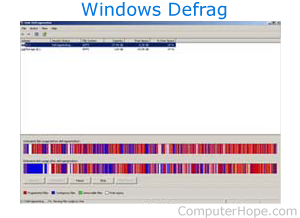
To access and run the Microsoft Defrag utility, select your version of Windows below and follow the instructions.
Do not run Defrag on an SSD (solid-state drive) or a flash drive. For help with newer media, see: Do I need to defrag my SSD or flash drive?
Windows 11 Defrag
To run Defrag in Windows 11, follow the steps below.
- On the Windows taskbar, click the magnifying glass icon.

- In the text field at the top of the search window, type defrag and press Enter. Or, select the Defragment and Optimize Drives option in the search results.
- Click the drive you want to defrag and optimize.
- Click the Optimize button to begin the defragmentation process.
You can schedule the defrag process to run automatically by clicking the Change settings button in the Optimize Drives window.
Windows also supports running Defrag from the Windows command line. For a syntax and full listing of defrag options in the command line, see our defrag command page.
Windows 10 Defrag
To run Defrag, follow the steps below.
- In the Windows Search box, on the taskbar, type defrag and select the Defragment and Optimize Drives option in the search results.
- Click the drive you want to defrag (A), and then the Optimize button (B).
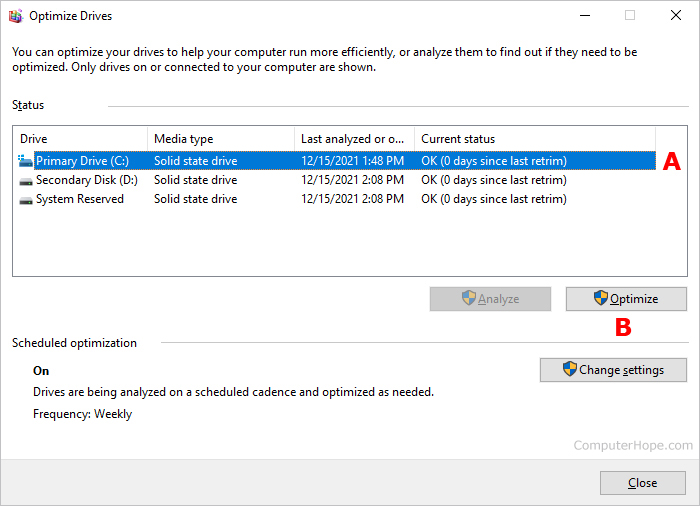
You can schedule the defrag process to run automatically by clicking the Change settings button in the Optimize Drives window.
Windows also supports running Defrag from the Windows command line. For a syntax and full listing of defrag options in the command line, see our defrag command page.
Windows 2000, XP, Vista, 7, and 8 Defrag
To run Defrag, follow the steps below.
- Double-click the My Computer icon or open Explorer.
- Highlight the local hard disk C: drive by clicking it once.
- Right-click the highlighted local drive and select Properties.
- Click the Tools tab and then the Defragment now button.
Windows also supports running Defrag from the Windows command line. For a syntax and full listing of defrag options in the command line, see our defrag command page.
Windows 95, 98, and Me Defrag
Windows 95 improved the functionality of Defrag, as did Windows 98. To run Defrag from Windows, follow the steps below.
- Click Start.
- Click Run and type Defrag in the run box.
- Click OK.
- In the Defrag window, select the drive you want to be checked and click OK.
Windows also supports running Defrag from the Windows command line. For a syntax and full list of defrag options in the command line, see our defrag command page.
Windows NT Defrag
Windows NT is not shipped with Microsoft Defrag. However, various third-party companies offer utilities that Defrag and check your hard drive for you. Symantec a well respected computer company, offers such a program.
Windows 3.x and MS-DOS Defrag
Defrag was first available in MS-DOS 6.0 and was available ever since. If you are running MS-DOS 6.0+ and want to run Defrag, follow the steps below.
- If you are in Windows 3.x, click File and then Exit to get to the MS-DOS prompt.
- At the prompt, type CD\DOS and press Enter.
- From the C:\DOS> prompt, type Defrag and press Enter, which should begin running Defrag on the computer.
Finally, some computer manufacturers have changed the installation directory of where Defrag is located. If you cannot run Defrag from DOS directory, go to the Windows directory by typing CD\Windows. See the MS-DOS Defrag command page for additional information on this command.