
Defrag
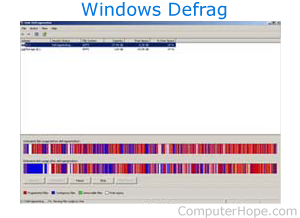
Defrag is a Microsoft utility first included with MS-DOS 6.0, and in all versions of Windows. It is designed to help chronologically order the data on the hard drive. Defrag places each part of a program together instead of scattered throughout the hard drive, allowing the read-write head to access the data faster on the hard drive.
In Windows this accessory may also be shown as Optimize Drives and Defragment and Optimize Drives.
Windows 98 and later includes a version of Defrag that places commonly accessed data at the beginning of the drive. Doing so may increase the efficiency of HDD performance. However, unless the hard drive is seriously fragmented, you will not notice a significant difference after defragging the hard drive.
The picture shows Microsoft Windows Defrag. As shown, this hard drive is seriously fragmented (each red portion is fragmented files). In this example, if the Defrag was allowed to be completed, you would notice a significant improvement in performance.
Defragmentation, Hard drive terms, Optimize, ScanDisk, Windows Accessories