
How to determine the SIMM type
Today, a SIMM (single inline memory module) is only found in older computers (early 90's). They've replaced by DIMMs.
Speed of SIMM
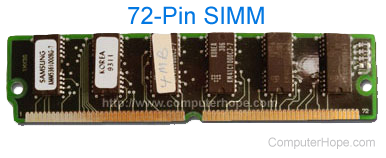
You can determine the speed of the chip by looking at the part number of each chip on the SIMM board. The number ends with a dash and a digit which indicates the rate speed in nanoseconds of the chip. For instance, "-7" would indicate that the memory has a memory bandwidth (data read rate) of 70ns.
Size or capacity of SIMM
Look at the four digits to the left, these often carry information about the number of bits in the chip. A 4256 indicates 256 K bits arranged in sets of four, for a total of 1 Mb. "1000" indicates 1 MB of bits arranged in one set.
With some memory, the last one or two digits may be changed to indicate different kinds of memory; there are 1 MB chips that end with 4256, 4257, and 4258. In this case, round the last digits to an even 256 or thousand. Three-chip SIMMs have two larger chips that are quadruple the capacity of the third chip. The third chip is dedicated to parity data.
Parity or Non parity
To determine if the SIMM is Parity or Non Parity, look for x36 or x9. These specifications indicate that the chip is parity and has error checking. The x36 is used with 72-pin SIMMs and x9 is for 30-pin SIMMs. If you have x32 or x8, the chip is Non Parity or has no error checking. The x32 is used with 72-pin SIMMs and x8 is used with 30-pin SIMMs.
Another maybe more easier method would be to count the total chips on the circuit board. If you see three or nine discrete chips, the SIMM probably includes a parity. If there are two or eight chips, the SIMM probably does not include parity bit. In this case, divide the number of bits by 8 to determine bytes.