Computer Hope

Other Pages

Home
Site map
Computer help

Dictionary
News
Q&A
What's new

Tools

E-mail this page
Print Preview
Edit this page


Computer Hardware
Information about computer memory.

Quick links

Memory ABCs
SIMM Information
DIMM Information
Upgrade Questions
Troubleshooting
Memory Diagram
Upgrade Help
Buying Tips
Memory definitions

MEMORY ABCs

Memory, which is commonly referred to as RAM (Random Access Memory), is a temporary (Volatile) storage area utilized by the CPU. Before a program can be run, the program is loaded into the memory which allows the CPU direct access to the program. Memory is a necessity for any computer and it is recommend that you have at least 64MB of memory for your IBM or Macintosh.

There are four groups of memory; we have created a chart which illustrates and tells what each of these groups do. Click here for the memory diagram.

Memory is commonly confused with Hard Drive Space. There are two types of memory; the first type of memory is the memory explained in the above paragraph, this memory is available in computer chips; the other type of memory is actually Hard Drive Space which is stored on the computer Hard Disk Drive. The Hard drive is actually a physical drive which contains several parts and is generally larger than the amount of memory found in your computer.

The below sections help describe the most commonly found types of memory in computers.

SIMM INFORMATION

Single In-line memory module (SIMM) - A slender circuit board dedicated to storing memory chips. Each chip is capable of holding 8 to 9 chips per board, the ninth chip usually an error checking chip (parity / non parity). The typical bus from the chip to the motherboard is 32-bits wide. When upgrading a Pentium motherboard you will be required to upgrade 2 of the same type of chips at the same time to accommodate the Pentium processor.

Determining SIMM memory specifications:

SPEED: You can determine the size amount of the chip by looking at the part number of each chip on the SIMM board. For 2-, 8- and 9- chip SIMMs, all the chips should have the same part numbers. Look at the number that ends with a dash and a digit such as "-7". This is the rate speed or nanoseconds of the chip. With "-7" this would indicate that the memory is 70ns.

SIZE: Look at the four digits to the left of this number; these often carry information about the number of bits in the chip. A 4256 indicates 256K bits arranged in sets of four, for a total of 1Mb. "1000" indicates 1MB of bits arranged in one set.
With some types of memory, the last one or two digits may be changed to indicate different kinds of memory; there are 1MB chips that end with 4256, 4257, and 4258. In this case, round the last digits to an even 256 or thousand. Three-chip SIMMs will typically have two larger chips that are four times the capacity of the third chip (because 4 plus 4 plus 1 makes 9, which is the number of bits needed per byte including parity).

PARITY / NON PARITY: To determine if the SIMM is Parity / Non Parity, look for x36 / x9 which indicate that the chip is parity (Error checking). x36 is used with 72-pin SIMMs and x9 is for 30-pin SIMMs. If x32 / x8 this would be an indication that the chip in Non Parity (Non Error checking) x32 is used with 72-pin SIMMs and x8 is used with 30-pin SIMMs.

Another method: count the chips. If you see three or nine discrete chips, the SIMM probably includes a parity. If there are two or eight chips, the SIMM probably does not include parity bit. In this case, divide the number of bits by 8 to determine bytes.

SIMM Memory and Pentium computers: When updating the computer's memory with a Pentium processor, ensure that you purchase two SIMMs rather than one. Such as if planning to upgrade to 32 MB of RAM that you use two 16 MB SIMMs rather than one. This must be done to allow the memory to work properly with the Pentium processor.


DIMM INFORMATION

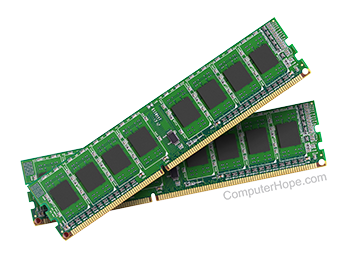
Dual In-line Memory Module (DIMM) - Type of Circuit board that holds memory chips. DIMMS have a 64-bit path because of the Pentium Processor requirements. Because of the new bit path, DIMMS can be installed one at a time un-like SIMMs which on a Pentium would require two be added.

Some of the advantages DIMMs have over SIMMs:
DIMMs have separate contacts on each side of the board, thereby providing twice as much data as a single SIMM.
The command address and control signals are buffered on the DIMMs. With heavy memory requirements this will reduce the loading effort of the memory.


Index

Category:
Hardware

Companies:
Click here

Related Pages:
Motherboard


Resolved

Were you able to locate the answer to your questions?

TECHNICAL SUPPORT

Reference

Issue / Question
CHADD Additional information with installing computer hardware.
MEM Additional information and help with the mem command.
FORUM If your question is not listed on this page please try our online forum.
CH000149 Determining how much RAM is installed and available.
CH000318 Himem.sys and or emm386 errors.
CH000374 Lost system resources.
CH000375 Out of memory errors.
CH000376 Memory Parity errors.
CH000385 CMOS memory size mismatch.
CH000394 Extended RAM failed at offset 1A.
CH000397 Program too big to fit into memory.
CH000401 Computer does not detect all new memory.
CH000708 How can I test my memory to determine if it is bad?
CH000910 Determining what type of memory to use in a memory upgrade.
CH000996 Computer has three short beeps as it starts.


Home - Computer help - Contact - Dictionary - Links
Link to Computer Hope - Bookmark Computer Hope