
Clipboard

The clipboard, also known as pasteboard, is a location on a computer, phone, or tablet memory that temporarily stores cut or copied text or other data. Once something is stored in the clipboard, it can be pasted to a new location as much as needed. The clipboard holds its information until you cut or copy something else or log out of the computer.
For example, a user may copy information from a word processor and paste it into an e-mail message. If the user pastes from the clipboard multiple times, the same information is pasted repeatedly. If the user copies something else, that new information replaces the old information in the clipboard.
If you ever need to type something more than once, type the text once, copy that text, and then paste it as much as needed.
How to copy or move information to the clipboard
On a computer
Use the copy feature to copy information from a program to the clipboard. For example, you could highlight the text, image, or another object you want to copy, and once highlighted, right-click it and choose the option to copy. Alternatively, you could use the copy keyboard shortcut Ctrl+C on the PC and Chromebook or Command+C on a Mac.
Use the cut feature to move text or another object from a program to the clipboard. For example, you could highlight the text, image, or another object you want to cut, and once highlighted, right-click it and choose the option to cut. Alternatively, you could use the cut keyboard shortcut Ctrl+X on the PC and Chromebook or Command+X on a Mac.
If you're text from one program to another, make sure you're familiar with how to quickly switch between open programs. For further help, see: How to quickly change between open programs on Mac and PC.
If you're using Microsoft Word, use Spike to copy multiple items and paste everything at once.
On a mobile device
To copy text or a picture, use the copy feature. Highlight the text or picture, tap the highlighted text or picture with your finger, and select the Copy option that appears.
To move text or a picture, use the cut feature. Highlight the text or picture, tap the highlighted text or picture with your finger, and select the Cut option that appears.
Copying information from the clipboard to another program
On a computer
After completing the steps above to copy or move information to the clipboard, you can place it in any program using paste. For example, you could move to where you want to paste text, picture, or another object, right-click a blank area, and select the option to paste. Alternatively, you could use the paste keyboard shortcut Ctrl+V on a PC and Chromebook or Command+V on a Mac.
On a mobile device
Android and Apple iOS devices, including the iPhone and Samsung Galaxy devices, allow users to copy information from the clipboard to any program using the paste feature. After copying the information to the clipboard, tap in the program where you want to paste the content. Tap again at that same location and select the Paste option that appears.
How do I open the clipboard?
Many operating systems include "clipboard viewers" that display the information stored in the clipboard. These utilities can often configure the clipboard with permissions or view its history. Below are the steps to view the clipboard in Windows, macOS, mobile devices, and a Chromebook.
Windows 11
- Click Start, then click the Settings
 icon.
icon. - On the right side of the Settings window, scroll down and click the Clipboard option.
- For the Clipboard history option, click the toggle switch to the
 position.
Once enabled, you can view the clipboard history by pressing the Windows key+V keyboard shortcut.
Windows 10
In the October 2018 update for Windows 10, Microsoft introduced a new clipboard to view the history of content copied. However, the clipboard history is only available for copied text and images up to 4 MB in size.
To enable the clipboard history feature, follow the steps below.
- Click Start, then click the Settings icon.
- On the Settings window, click the System option.
- In the left navigation pane, click the Clipboard option.
- Under Clipboard history, click the toggle switch to the
 position.
Once enabled, you can view the clipboard history by pressing the Windows key+V keyboard shortcut.
Windows Vista, 7, and 8
Unfortunately, Microsoft decided not to include a clipboard viewer in Windows Vista, 7, and 8. Download and use a third-party utility or program to view the clipboard contents for these versions of Windows.
The command-line clip command still works. See the command line section for further information.
Windows 2000 and XP
Microsoft Windows 2000 and XP users may find it difficult to locate the clipboard because it was renamed to the Clipbook viewer. It is accessible by opening Windows Explorer, then the "Winnt" or "Windows" folder, then the "System32" folder. Find and double-click the clipbrd.exe file.
Users can also click Start, Run, type clipbrd, and press Enter to execute this program.
Windows 9x, Me, and NT
Microsoft Windows 95, 98, NT 4.0, and Me come installed with a clipboard viewer accessible by clicking Start, Programs, System Tools, and Clipboard Viewer. The clipboard viewer is also executable through the clipbrd.exe file in the Windows directory.
Windows command line
There are no commands in the standard Windows command line that allow you to paste or view the clipboard's contents. However, you can copy text to the clipboard with the clip command.
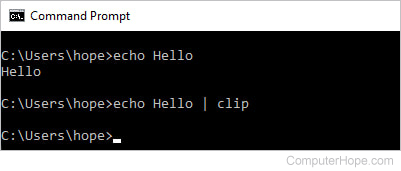
Then paste the text to another program, such as Notepad.
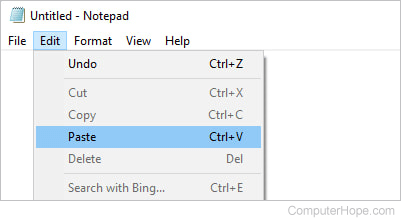

See the clip command page for further information and examples.
Windows PowerShell
Using PowerShell, paste the clipboard with the Get-Clipboard command or its alias gcb.
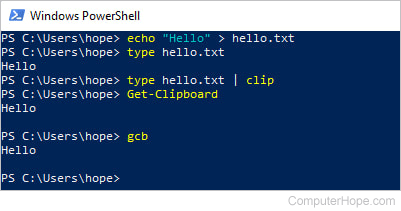
To use PowerShell, open the Start menu and click Windows PowerShell > Windows PowerShell.
Apple macOS
You can view the clipboard using the steps below on a Mac computer.
- Open the Finder application.
- In the menu bar at the top of the Finder window, click Edit and select Show Clipboard.
Only the last copied item is displayed in the clipboard. Install a third-party clipboard manager application, like Paste, to view more clipboard history.
iPad and iPhone
Unfortunately, Apple does not include a clipboard viewer on iPads and iPhones. Download and use a third-party app to view the clipboard contents, like Paste or Clip+.
Android device
Google does not include a clipboard viewer for the stock Android operating system on phones or tablets. Some versions of Android, such as Samsung One UI (User Interface), include a clipboard icon on the default keyboard. Open the keyboard and press the clipboard icon above the keys to access it. This icon could be hidden behind a meatballs menu, as seen in the image.
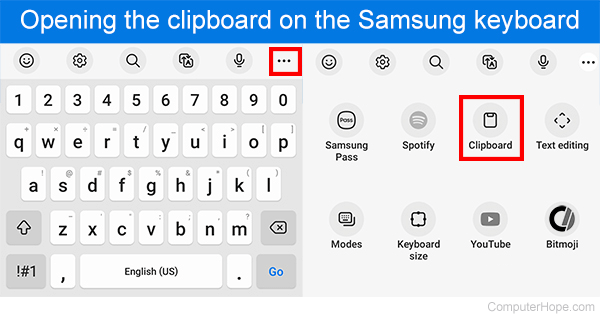
If your keyboard doesn't have a clipboard icon, you can download and use a third-party app like Gboard to view the clipboard contents.
Chromebook
To open and view the clipboard manager on a Chromebook, press the Search key+V keyboard shortcut. The clipboard manager opens in the middle of the screen, showing you the current contents and what can be pasted.
How many things can be stored in the clipboard?
The clipboard can store one thing at a time. For example, selecting and copying a paragraph of text or an image, is considered one thing. If one thing is currently stored in the clipboard and you copy another thing, it overwrites what's stored in the clipboard.
You can use the MultiClipBoardSlots program from SoftwareOk to have a clipboard capable of copying and pasting 10 different items.
How much data can the clipboard store?
The amount of data the clipboard can store depends on how much physical memory (RAM) and configured virtual memory (paging file) is in the computer. The more memory a computer has, the more data you can copy to the clipboard.
Only copied text and images are stored in the clipboard. If you copy a file, only information about the file is stored, not the file itself. For this reason, it's uncommon to need to increase the amount of data the clipboard can store. However, if you are working with large or raw images, you might encounter a case where more memory is needed to allow the clipboard to store the image data.
Copy, Cut, Ditto clipboard, Office Clipboard, Operating system terms, Paste, Snipping Tool, Word processor terms