
Collate
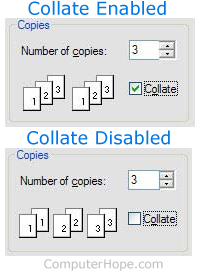
With printing, collate describes how printed material is organized. For example, imagine printing a document that is five pages long. If multiple copies are being printed, and "collate" is selected, pages 1, 2, 3, 4, and 5 would print in that order, then repeat. All pages of one copy of the document print before the next copy's pages are printed. If collate was disabled, all copies of page 1 would print, then all copies of page 2, etc. The picture shows collate printing enabled and disabled.
The "Collate" option is grayed out unless you're printing multiple copies.
How to collate print
Collating is often enabled by default; however, collate is also adjustable through the print window before printing. For example, in Microsoft Word a user would enable or disable collate by performing the steps below.
- Open Microsoft Word and the document you want to print.
- Click the print icon, or click File and then Print.
- In the Print window, increase the number of copies, and then check or uncheck the collate option to enable or disable it.
Almost all document programs have a collate option in the print settings or print window when printing a document.