
How to print a document, picture, or another file
Each file, document, and the associated programs used to open them are different. Consequently, we can only give a basic overview of the steps used in the printing process. They are meant as a general guideline and may not apply to the particular item you are trying to print. That said, many programs have adopted a standard method of printing. The following sections should help you print your document or file.
The steps on this page are for desktop or laptop computer users. If you're on a mobile device, like an iPad or iPhone, see: How to print using a smartphone or tablet.
Before proceeding, ensure your printer is turned on, has up-to-date drivers, and is configured correctly. See: How to set up and install a computer printer.
Steps on printing a document, picture, or another file
Before trying the steps below, consider using the keyboard shortcut Ctrl+P on a PC or Command+P on an Apple computer. In most programs, it brings up a print menu.
The following steps show you how to print a document or another file using a program's print icon or through the program's menu bar.
- Open the document or file you want to print with the appropriate program. For example, a document might be opened in a word processor, like Microsoft Word, or a PDF file could be opened using Adobe Reader.
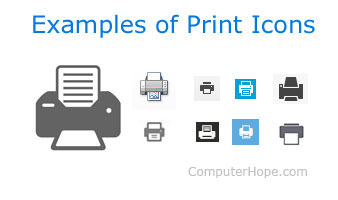
- Near the top of the program window, look for a print icon. As seen in the picture, icons usually resemble a printer with a piece of paper coming out of it. If you don't see a print icon, look for a menu bar. Click File, and select Print from the drop-down menu.
- After performing either of these actions, a Print properties window appears, letting you select additional options (e.g., number of copies). Once you've adjusted the options to your liking, click OK or Print.
Printing selected text or picture from an Internet web page
For printer-friendly pages like Computer Hope, all navigation menus and other non-important formatting are automatically removed when you print a page. If the web page is not printer-friendly, or you only want to print a section of a page or a specific image, follow the steps below.
To print only sections of text or images, it may be easier to copy the object and paste it into a document. Once all information is gathered in a single document, you can print it from there. See: How to copy text and images from a web page.
Print a selection of text
All browsers support the ability to print selected text. Here is how to do so:
- Highlight the text you want to print on the page.
- Press Ctrl+P on a PC or Command+P on an Apple computer to open the print options window.
- In the options window, choose Selection only or Selection from the available options.
You may need to click More settings or Advanced options before seeing the selection options.
Print only a picture from a web page
To print only a picture on a web page, we recommend opening the picture by itself. To do this, right-click the image and select "Open image in a new tab" or "Open image." Once the image is displayed by itself, press Ctrl+P on a PC or Command+P on an Apple computer to start the printing process. You can try these steps now on the image below.

When I print, it's saving to a file and not printing
By default, some programs try to save a file as a PDF (Portable Document Format) or XPS (XML Paper Specification) when you attempt to print. Also, computers can have multiple printers installed on them. If you're utilizing a program with this capability, your default "printer" may be changed to that option.
For example, when you attempt to print, you may see "Print to PDF" or "Save as PDF" as the default selected output choice. To print, choose a physical printer from the properties window rather than the PDF option. Furthermore, you may set this option as the default so that a printer device is chosen each time you attempt to print in the future.
I cannot print because other print jobs are waiting
If the printer is not turned on, online, or ready, all print jobs are sent to a print queue, where they wait until the printer is available. Once the printer is ready, all jobs should resume in the order they were sent. If the jobs do not resume, the printer is not ready or there is another problem. You can test for a problem by canceling all print jobs and trying again.
If you are using a network printer, you cannot print unless it is online. If the printer is turned off, not connected to the network, or there is another network-related issue, the printer is shown as offline.
If you are still unable to print
Some programs (often only older ones) may utilize the keyboard's print screen or prt scrn key to send a file to the printer. If your program does not work with the previous steps, try pressing this key instead.
Additionally, if you find the print option, but it's grayed out, or you receive an error, there are problems with the printer or its drivers.
In some situations, a program may not have a print option. If this happens, copy and paste the information to a document in another program and print from there.