
Connection
A connection is a link between a plug or connector into a port or jack. For example, your monitor, mouse, and keyboard must connect to the computer before they work.
Different forms of the word connect
The word "connect" can be used in different ways when describing a connector and how it connects. Below lists all forms of the word with further information about each.
Connect, connected, and connection - The description of two or more devices successfully sending and receiving information. For example, if you are reading a web page, your computer connects to the Internet and has a good connection.
Nothing on the Internet would work if the connection were interrupted at your home or office. If the connection could not be established with the server hosting the web page, you would be unable to view the web page, but everything else on the Internet would still work.
Connecting - Describes connecting a plug, wire, or another device to the computer. For example, I'm connecting my monitor to my computer to get a picture and see what's happening.
Connecting also describes two or more devices establishing a connection. For example, when a Dial-up Modem connects to an ISP (Internet service provider), you'll hear the phone dialing the number and then handshaking.
The handshake (heard by playing the above audio file) is the two computers communicating and establishing a connection. Once the connection is established, the noise is no longer heard.
Connections - An overall description of all available expansion slots, ports, and jacks (more than one) on a computer or another device. For example, my USB hub has three available USB connections.
Connector - The description of the end of the cable that joins a cable to a port. Centronics, DB, DIN, mini-plug, and USB are all examples of connectors.
Examples of computer connections
Below is a picture of the back of a desktop computer and each connection and port. Although your desktop computer's layout may differ, this diagram gives you a better understanding of where everything connects.
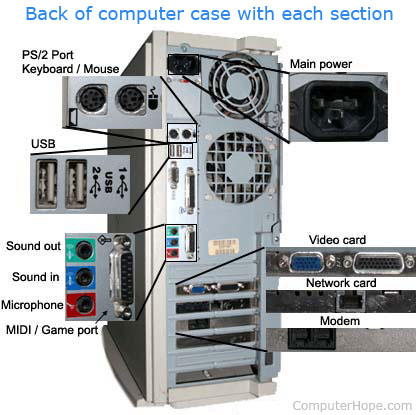
Below are related pages for each of the connections and some related terms. Clicking each link gives you more information about each connection and related information.
Connections on the back of the computer
- AT (advanced technology)
- BNC (Bayonet Neill-Concelman)
- Composite
- DisplayPort
- DVI (digital visual interface)
- eSATA
- FireWire (IEEE-1394)
- HDMI (High-Definition Multimedia Interface)
- MIDI (musical instrument digital interface)
- Modem (RJ-11 aka telephone)
- Network (RJ-45)
- Parallel port
- PS/2 port
- RCA
- S-Video
- S/PDIF
- SCSI (small computer system interface)
- Serial port (RS-232)
- Sound card (sound out or line out, sound in or line in, microphone, and MIDI (joystick).
- USB (universal serial bus)
- VGA/SVGA
Why are the colors on connections different?
Connections on the back of a computer may be color-coded to help locate the appropriate port for a peripheral device. The list below includes many ports and their associated colors.
- Keyboard (PS/2) - Purple
- Mouse (PS/2) - Green
- Serial - Cyan
- Printer - Violet
- Monitor (VGA) - Blue
- Monitor (DVI) - White
- Line out (headphones) - Lime Green
- Line in (microphone) - Pink
- Audio in - Grey
- Joystick - Yellow
Many modern connector ports (HDMI, USB, FireWire, Ethernet, etc.) are black and need to be identified by their shape rather than color.
Internal connections
- ATA (Advanced Technology Attachment)
- Expansion slots
- IDE/EIDE
- SATA (Serial AT Attachment)
- SCSI
How do I check connections?
Computer Hope or another technician may tell you to "check your connections" when troubleshooting a problem. This suggestion refers to verifying a cable is connected correctly on both ends of the cable. For example, with monitor troubleshooting, you'd verify the cables on the back of the monitor and computer are connected correctly. If all cables are firmly connected, disconnect a cable, verifying nothing looks wrong with the cable or port, and reconnecting the cable is also a good idea.
What connection connects computers?
Today, the most common method of connecting computers over a network. To connect to a network, a computer uses a network interface card to connect using a cable like a Cat 5 cable or wirelessly using Wi-Fi.
Back panel, Cable, Computer, Connectionless, Direct connection, Hardware terms, Install, IoE, Motherboard, Parallel Port, VIA, Wire