
Control keys
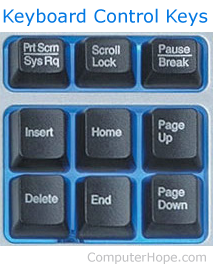
Not to be confused with the "Ctrl keys," control keys enable additional control over a document and the computer. Print Screen, Scroll Lock, Pause, Break, Insert, Home, Page Up, Delete, End, and Page down are all examples of control keys. The picture shows all the control keys and how they look on a US keyboard.
For help and information with the two controls keys labeled "control" on Apple keyboards, see our Ctrl page.
The picture below is an example image of a Saitek keyboard to help illustrate where the control keys are commonly on the keyboard.
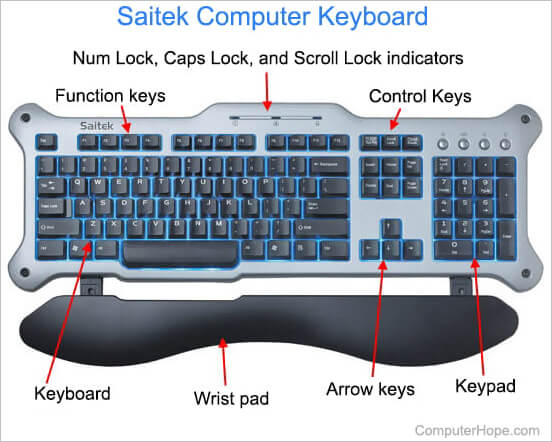
How many control keys are on a computer keyboard?
When describing the keys that give control of a document or computer, there are nine control keys. When describing the modifier keys labeled as "Ctrl" or "control," there are two control keys.
Other language control keys
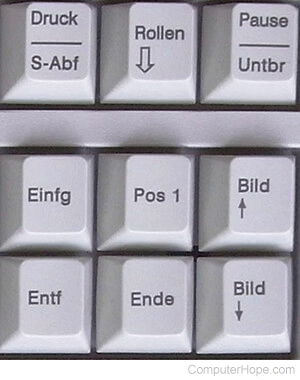
Other languages, such as German on a QWERTZ layout, rename the control keys to make more sense to the user using them. The picture shows that each English key is replaced with a German equivalent label.
German control key English equivalents
- Druck / S-Abf - German for Drucken (to press) / system abfrage (system query) is the Print Screen key.
- Einfg - German for Einfügen (insert) is the Ins key.
- Entf - German for entfernen (remove) is the Del key.
- Rollen - German for rollen (roll) is the Scroll Lock key.
- Pos 1 - German for Position eins (position one) is the Home key.
- Ende - German for Ende (end) is the End key.
- Pause / Untbr - German for Pause / Unterbrechen (interrupt) is the Pause key.
- Bild (up arrow) - German for Bild nach oben (picture up) is the Page up key.
- Bild (down arrow) - German for Bild nach unten (picture down) is the Page down key.