
Interlacing
Interlacing may refer to any of the following:
1. With a computer monitor or another display, interlace or interlacing describes how the picture is created. With an interlaced display, the picture is created by scanning every other line and on the next scan, scanning every opposite line. Interlacing facilitates a faster refresh rate by having less information during each scan at a lower cost. Unfortunately, this may cause flickering or noticeable line movements in some situations.
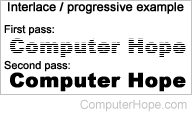
2. Interlacing refers to an interlaced graphic image, such as an interlaced GIF (graphics interchange format) or progressive JPEG (Joint Photographic Experts Group). These images are displayed by loading odd or even lines first and then the other lines on the next cycle. For users with slow Internet connections (e.g., dial-up modem), a large, progressive image appears faded as it loads.
GIF, I, JPEG, Noninterlaced, Progressive, Raster, Refresh, Video terms