
IRC
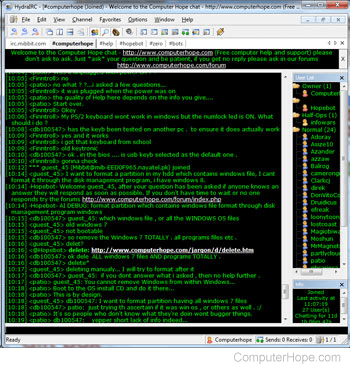
Developed in August 1988, by Jarkko Oikarinen, IRC is short for Internet Relay Chat. It is a popular chat service still in use today. IRC enables users to connect to a server using a program or web service and communicate with each other live. For example, the Computer Hope chat room uses an IRC server to allow its users to talk and ask computer questions live.
To connect and chat with other IRC users, you must have an IRC client or a web interface that connects you to IRC servers. There are many software IRC clients that enable users to connect and communicate to other IRC servers. We suggest the HydraIRC program.
Below is a listing of some IRC commands that can be used while connected to an IRC server. Although most of these commands work with most IRC clients and IRC servers, some commands may be invalid.
IRC was featured as a top term of 1998.
| Command | Explanation |
|---|---|
| /away (message) | Leaves a message explaining to others why you are gone. |
| /clear | Clears the text from the current window. |
| /clearall | Clears all the text from all open windows on your screen. |
| /dcc chat (username) | Opens a chat window with the username you specify. |
| /help | Brings up a list of all the commands or the help window. |
| /ignore (on/off) (username) | Allows you to ignore or unignore a user. |
| /ignore (+/-) (username) | An alternative to ignoring or not ignoring a user. |
| /join (#channel) | Joins a particular chat group, and opens the chat in a new windows. |
| /me (action text) | Allows you to do different actions showing the text in a different color. |
| /msg (username) (message) | Sends a message to the user of your choice without anyone else seeing it. |
| /nick (username) | Changes your username. |
| /part (channel) | Leaves the specified channel. |
| /ping (username) | Pings the specified user, telling you how far they are in seconds. If it returns 10 seconds, it would take 10 seconds for that user to see your message. |
| /ping (channel) | Pings all the users in a specified channel. |
| /query (username) (message) | Opens a new chat window to this user and then sends a private message. |
| /whois (username) | Shows information about the specified user. |
| /whowas (username) | Shows information about a specified user that was in earlier. |
If you log into an IRC server frequently and use the same nick, make sure to register the nick with nickserv to prevent others from using the same name. See the nickserv definition for further information about this command.
Finally, if you're running an IRC channel and want to register the channel, use the chanserv command. See the chanserv definition for further information about this command.
Ban, BNC, Chanfix, Chanserv, Chat, Chat terms, Computer acronyms, CTCP, DCC, G-Lined, HOP, Internet terms, Ircle, Kicked, K-Line, Luser, mIRCScript, MUT, Notice, Op, Privmsg, SOP, Trillian, WALLOPS, X, Xirc, Z:Lined