
How to view the HTML source code of a web page
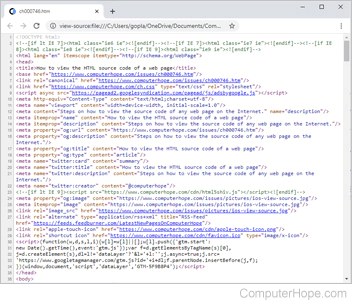
Every major Internet browser allows users to view any web page's HTML (hypertext markup language) source code. The following sections contain information on the multiple ways to view the source code in each major browser. To proceed, choose an entry from the list below and follow the instructions.
Introductory information
When viewing the source code of a web page, the information and code processed by the server won't appear. For example, a search engine processes information on a server and then displays the results on a web page. In other words, you can view the code that makes up the results page, but you cannot view the search engine's source code.
This rule applies to all server-side scripts, SSI (server-side include), and programming code. Therefore, you cannot view a script's source code used in search engines, forums, polls, chat, etc. Also, copying the information from the source code may cause errors or direct you back to the page from which you copied the information.
Google Chrome

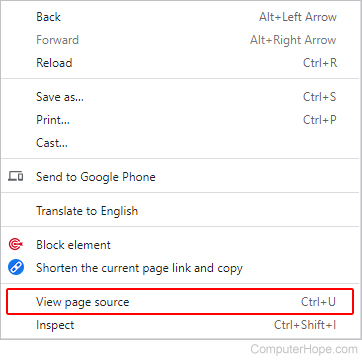
To view the source code of a web page in Google Chrome, use any of the following methods.
View source code only
Method one
To view only the source code, press the keyboard shortcut Ctrl+U on your computer's keyboard.
Method two
Right-click a blank part of the web page and select View page source from the pop-up menu.
View page source with elements
- Open Chrome and navigate the web page whose source code you'd like to view.
- Click the Customize and control Google Chrome
 icon in the upper-right corner of the browser window.
 - From the drop-down menu, select More tools, then select Developer tools.
- Click the Elements tab in the top-left corner of the new section at the bottom of the screen.

In Chrome, pressing F12 or Ctrl+Shift+I also brings up the interactive developer tool. This tool provides more interaction with the source code and CSS settings, allowing users to see how changes in the code affect the web page immediately.
Mozilla Firefox

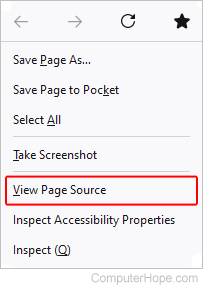
To view the source code of a web page in Mozilla Firefox, use any of the following methods.
View source code only
Method one
To view only the source code, press Ctrl+U on your computer's keyboard.
Method two
Right-click a blank part of the web page and select View Page Source from the pop-up menu.
View page source with elements
- Open Firefox and navigate to the web page whose source code you want to view.
- Click the Menu
 icon in the top-right corner of the screen.
 - Select More tools in the drop-down menu, then select Web Developer Tools from the expanded menu.
- Click the Inspector tab in the top-left corner of the section at the bottom of the screen.

In Firefox, pressing F12 or Ctrl+Shift+I also brings up the interactive developer tool. This tool provides interaction with the source code and CSS settings, allowing users to see how changes in the code affect the web page in real-time.
View a section of the page's source code
- Highlight the portion of a web page where you want to view the source code.
- Right-click that highlighted section and select View Selection Source.
You can use the Firebug add-on to view and edit a page's source code, and view the changes live through the browser.
Microsoft Edge

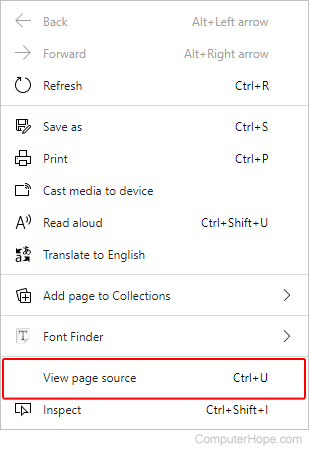
To view the source code of a web page in Microsoft Edge, use any of the following methods.
View source code only
Method one
To view only the source code, press Ctrl+U on your computer's keyboard.
Method two
Right-click a blank part of the web page and select View page source from the pop-up menu.
View page source with elements
- Open Microsoft Edge and navigate to the web page whose source code you want to view.
- Click the Settings and more
 icon in the upper-right corner of the screen.
 - Move your mouse over More tools in the drop-down menu, and select Developer tools from the expanded menu.
- Click the Elements tab at the top of the window on the right side of the screen.

In Microsoft Edge, pressing F12 or Ctrl+Shift+I also brings up the interactive developer tool. This tool provides interaction with the source code and CSS settings, allowing users to see how changes in the code affect the web page in real-time.
Microsoft Internet Explorer

To view the source code of a web page in Microsoft Internet Explorer, use any of the following methods.
View source code only
Method one
To view only the source code, press Ctrl+U on your computer's keyboard.
Method two
Right-click a blank part of the web page and select View source from the pop-up menu.
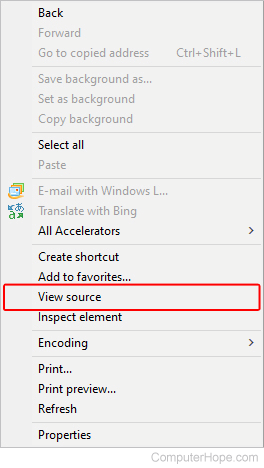
View page source with elements
- Open Internet Explorer and navigate to the web page whose source code you want to view.
- Click Tools
 in the upper-right corner.
 - Select F12 Developer Tools from the drop-down menu.
- Click the DOM Explorer tab at the top-left corner of the developer tools menu.

In Internet Explorer, pressing F12 brings up the DOM (document object model) tool. This tool provides interaction with the source code and CSS (cascading style sheets) settings, allowing users to see how changes in the code affect the web page immediately.
Safari

In Safari, viewing a webpage's source code requires enabling the developer options. The following sections show you how to turn on this feature and then how to view the source code of a web page.
Accessing developer options in Safari
- Open the Safari browser.
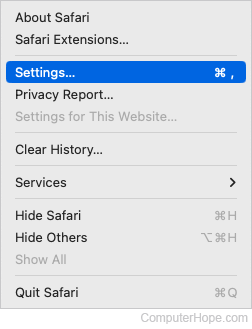
- Select
 from the menu bar at the top-left corner of the screen.
 - Select Settings... from the drop-down menu.
- Click the Advanced tab, and check the box next to the Show Develop menu in menu bar.
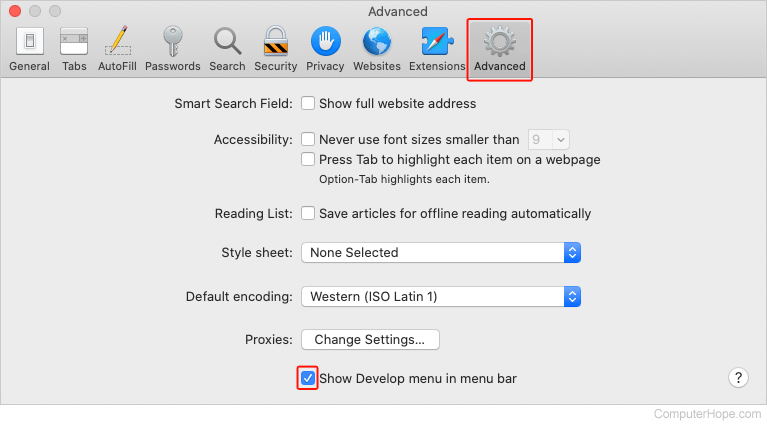
- You should now see the Develop selector in the Apple menu bar at the top of the screen.

Viewing the source code
You must have the developer options enabled for the following steps to work.
Method one
- Open Safari and navigate to the web page whose source code you want to view.
- In the Apple menu bar at the top of the screen, click the Develop selector and choose Show Page Source from the drop-down menu.
- In the center of the screen, click the Elements tab at the top of the developer tools section.

Method 2
Right-click a blank part of the web page and select Show Page Source from the pop-up menu.
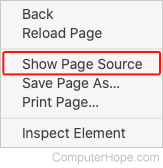
Once the developer options are enabled, you can also press Command+option+U to view the source code.
Opera

To view the source code of a web page in Opera, use any of the following methods.
View source code only
Method one
To view only the source code, press Ctrl+U on your computer's keyboard.
Method two
Right-click a blank part of the web page and select Page source from the pop-up menu.
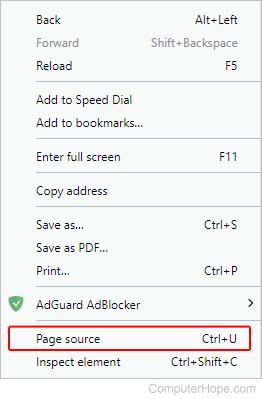
View page source with elements
- Open Opera and navigate to the web page whose source code you want to view.
- Click the Opera
 icon in the upper-left corner of the browser window.
 - Move your mouse over Developer in the drop-down menu and select Developer tools from the expanded menu.
- Click the Elements tab at the top of the window on the right side of the screen.
If you don't see the Developer submenu, select More tools → Show developer menu. Then, click the menu button again. You should now see the Developer entry listed.
In Opera, pressing Ctrl+Shift+I also brings up the interactive developer tool. This tool provides interaction with the source code and CSS settings, allowing users to see how changes in the code affect the web page in real-time.
Android phone or tablet using Chrome

- Open the Google Chrome browser on your Android phone or tablet.
- Open the web page whose source code you want to view.
- Tap once in the address bar and move the cursor to the front of the URL (uniform resource locator).
- Type view-source: and tap Enter or Go.
For example, to view the code for our homepage, you would type view-source:https://www.computerhope.com.
If the steps above don't work on your Android phone, use the method on the iPhone or iPad using Safari section. The same code works on Android phones. The only differences are using Chrome instead of Safari and how a bookmark is created.
If you find it difficult to navigate the source code on your mobile device using the method above, you may also want to consider an online tool.

iPhone or iPad using Safari
Viewing the source code of a web page on an iPhone or iPad takes a bit more work, but it is possible. The process requires you to create a bookmark, assign JavaScript code to it, and use the bookmark on a web page to view its source code.
If you'd prefer to use an app to view a web page's source code, you can download the free View Source app from the iOS App Store.
Create a bookmark to view source code
- Open the Safari browser on your iPhone or iPad.
- Access any web page, such as www.computerhope.com.
- Tap the More icon at the bottom of the screen.

You can also press and hold your finger on the Bookmark icon at the bottom of the screen until a menu appears.
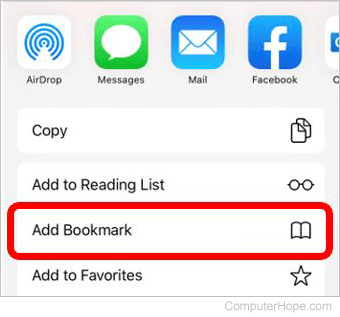
- In the menu that opens, tap the Add Bookmark option.
- Tap the bookmark name field, tap the x on the right side to clear the current name, and enter "View web page source code" as the new name.
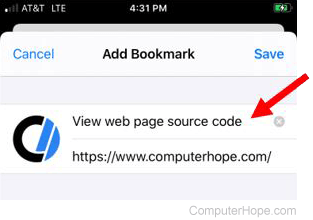
- Tap Save in the top-right corner to save the bookmark.
- Copy the entire JavaScript code snippet below.
javascript:(function(){var a=window.open('about:blank').document;a.write('Source code of '+location.href);a.close();var b=a.body.appendChild(a.createElement('pre'));b.style.overflow='auto';b.style.whiteSpace='pre-wrap';b.appendChild(a.createTextNode(document.documentElement.innerHTML))})();
- In Safari, access the bookmarks by tapping the bookmarks icon at the bottom of the screen.

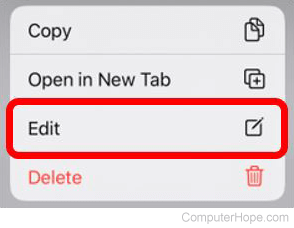
- Find the bookmark you created above, then press and hold your finger on the bookmark until a menu opens at the bottom of the screen.
- Tap the Edit option on the menu.
- On the Edit Bookmark screen, tap the URL, tap the x to clear the URL, and paste the JavaScript code from step 7 into the URL field.
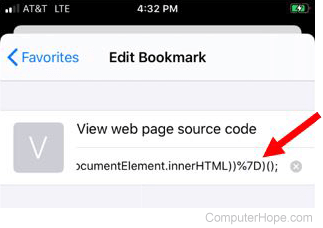
- Tap Done at the bottom-right of the screen to save the bookmark changes.
Use a bookmark to view source code
After you've created the bookmark above, you can now view the source code for a web page.
- In Safari, access the web page where you want to view the source code.
- Tap the bookmarks icon at the bottom of the screen.
- Tap the View web page source code bookmark you created.
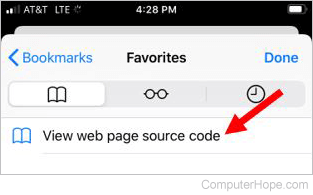
A new Safari browsing tab opens, displaying the source code for the web page.
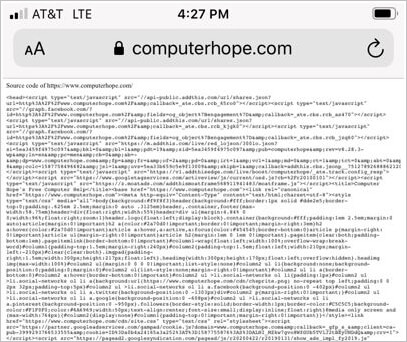
If you have difficulties navigating the source code on your mobile device using the above method, you may also consider using an online tool.
How to close the source code page or tool
Once done, viewing the source code on a web page, you may want to exit or close it. Closing the source code depends on the method used to open it.
- If you've used the Ctrl+U method (except Edge) or the right-click method, close the new tab that opened at the top of your browser window.
- If you've used the developer method (using F12 or Ctrl+Shift+I), press those same keys again, or click the
 icon in the upper-right corner of the tools window.
Use an online tool to view the source code
In addition to using a browser, several online tools allow you to view the source code of any web page. These tools may be helpful because most can format, stylize, and highlight the code to make it easier to read. Below is a short list of some tools.