
URL
Also known as an internet address or web address, a URL (uniform resource locator) is a URI (uniform resource identifier) and standardized naming convention for addressing documents accessible over the Internet and Intranet. The URL makes it possible for a computer to locate and open a web page on a different computer on the Internet. An example of a URL is https://www.computerhope.com, the URL for the Computer Hope website.
Overview of a URL
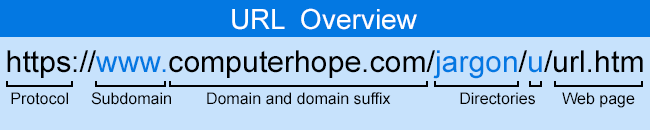
Below is additional information about each section of the HTTP URL for this page.
http:// or https://
The HTTP (hypertext transfer protocol) lets the browser know which protocol is used to access the information specified in the domain. An "HTTPS" protocol is short for "Hypertext Transfer Protocol Secure" and indicates that information transmitted over HTTP is encrypted and secure. After the HTTP or HTTPS, the colon ( : ) and two forward slashes ( // ) separate the protocol from the remainder of the URL.
A URL is not explicit to HTTP or HTTPS addresses; FTP (file transfer protocol), TFTP (trivial file transfer protocol), Telnet, and other addresses are also considered URLs and may not follow the same syntax as our example.
www.
Next, "www" stands for World Wide Web and distinguishes the content. This portion of the URL is not required and can be left out. For example, typing "http://computerhope.com" would still get you to the Computer Hope website. The address portion can also be substituted for an important sub-page known as a subdomain.
computerhope.com
Next, "computerhope.com" is the domain name for the website. The last portion of the domain is known as the domain suffix or TLD (top-level domain). It is used to identify the type or location of the website. For example, ".com" is short for commercial, ".org" is short for an organization, and ".co.uk" is the United Kingdom. There are several domain suffixes available. You register the name through a domain registrar to get a domain.
/jargon/u/
Next, "jargon" and "u" are the directories where the web page is on the server. In this example, the web page is two directories deep. To find the file on the server, it would be in the /public_html/jargon/u directory. The public_html directory is the default directory containing the HTML (hypertext markup language) files with most servers.
url.htm
Finally, url.htm is the actual web page on the domain you're viewing. The trailing .htm is the file extension of the web page that indicates the file is an HTML file. Other common file extensions on the Internet include .html, .php, .asp, .cgi, .xml, .jpg, and .gif. Each of these file extensions performs a different function, like all the different types of files on your computer.
As you may have noticed, the protocol, domain, directories, and files are separated by forward slashes ( / ).
Where is the URL located?
A URL is usually located at the top of the browser window in the address bar or omnibox. On desktop computers and laptops, the URL is always visible, unless your browser is fullscreen. In most smartphone and tablet browsers, the address bar containing the URL disappears as you scroll down and only shows the domain when visible. When the address bar is not visible, scroll up the page. If only the domain is shown, tapping on the address bar shows the full address.
Most video-sharing pages (e.g., YouTube) have share links below the video or in the video. Using these sharing links is another way to get the URL of the video.
How to open a URL
You can open a URL by clicking a hyperlink. For example, clicking "hyperlink" in this paragraph opens a page describing hyperlinks.
If a URL is in printed material (e.g., e-mail or magazine) where it's not a hyperlink, you can open the page by typing the URL in the browser address bar. If the URL is in an e-mail, it can also be copied and pasted to the browser address bar.
Some printed material may also have a QR code to scan to open a web page with your smartphone.
How can I create my own URL?
Many social networking sites like Instagram, or shopping platforms like Etsy, allow you to have custom directories that link to your page. For example, the Computer Hope Facebook profile is at "facebook.com/computerhope." However, this URL is not a full URL but a specific section dedicated to your user profile.
To create a fully unique URL, such as "computerhope.com," obtain a custom domain from a domain name registrar. These companies allow you to purchase domain names, which can be attached to your website(s) or redirected to any web page you choose. For help with getting a domain, see the following link.
Website builders like Wix, Weebly, and Squarespace also allow you to purchase custom domain names automatically tied to your custom website.
What characters are not allowed in a URL?
Most people realize that spaces are not allowed in a URL. However, it is also important to realize, as documented in RFC 1738, the URL string can only contain alphanumeric characters and the !$-_+*'(), characters. Any other characters that are needed in the URL must be encoded.
Understanding more complex URLs and parameters
When a URL points to a script that performs additional functions, additional information (parameters) is added to the end of the URL. For example, a search engine URL pointing to a search results page includes a parameter with the search query words.
Below is an example URL that points to the Computer Hope search page, with the search query parameter of "example search."
https://www.computerhope.com/cgi-bin/search.cgi?q=example%20search
In this URL, the script is search.cgi in the cgi-bin directory. Because this file ends with .cgi, it is assumed to be a Perl script.
After the script file name is a ? (question mark). The question mark in a URL separates the URL from all the parameters or variables sent to the script. In the example above, the parameter is q=example%20search. The "q" is a variable name, and the "example%20search" is the value for that variable. Because no spaces are allowed in a URL, the space is encoded as %20. In many scripts, a + (plus) is also used to represent a space.
In our example, the script would use it as it is executed because there is a variable. Scripts are also not limited to only one variable. If the script needs multiple variables, each variable can be separated with a & (ampersand), as shown in the example below.
https://www.computerhope.com/cgi-bin/search.cgi?q=example%20search&example=test
In the example above, there are two variables. The "q" variable equals "example search," and the "example" variable equals "test." If the script looked for an example variable, it could be processed and perform an additional feature.
How to add a parameter to a URL
New parameters can be added to a URL by adding a "?" (question mark) if there are no other parameters or "&" (ampersand) if there are other parameters. Next, add the name of the parameter (e.g., "computer"), followed by an = (equals), and then the parameter value (e.g., "hope"). In this example, our home page URL with this example added parameter would look like the following.
https://www.computerhope.com?computer=hope
Is an IP address the same as a URL or web address?
No. An IP address is a unique number assigned to each device on a network. A domain name is assigned a unique IP address on the World Wide Web. When typed (e.g., computerhope.com), DNS (domain name system) translates the domain name into an IP address that routers use to find the web server. A domain name is used instead of an IP address because it's easier for humans to remember. For example, it's easier to remember "computerhope.com" than an IP address like "216.58.216.164". See our IP address for further information about an IP.
You could think of a domain name like a house picture and the IP address as the house's address. The picture gives you a representation of what the house looks like, but without the address, you'd never be able to locate that house.
Address, Computer acronyms, cURL, Internet, Internet terms, Intranet, IP, Naked URL, SEO terms, URI, URL Shortener, Web design terms, Whack