
How to restart Microsoft Windows

Restarting your computer is necessary for many common tasks, including installing new software and performing Windows Updates. Restarting your computer is also called a soft reboot. This page contains multiple methods for restarting Windows correctly. To proceed, select the method you want to use from the list below or read through each section individually.
If the computer is frozen (keyboard and mouse don't work or move), or there's nothing displayed, press and hold down the power button until the computer turns off. Once the computer is off, you can turn the computer back on to restart the computer.
If the computer has a blue screen or another error, try the Ctrl+Alt+Del shortcut method of rebooting.
Restarting from the Windows desktop
In any version of Windows, navigate to the desktop and press Alt+F4 on your keyboard. Doing so brings up a menu similar to the one displayed below. Click the down arrow for the drop-down list, select Restart, and click OK.
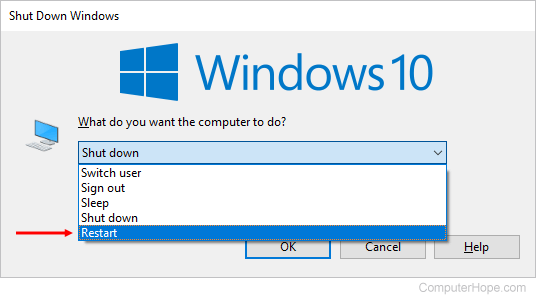
If you have not updated Windows 8 to version 8.1, see: How to Sleep, Restart, or Shut down Windows 8.
Restarting through the Start menu
Windows 11
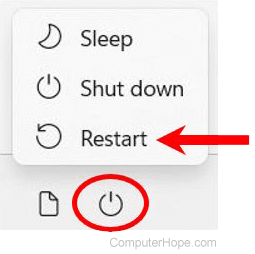
The Start menu in Windows 11 is slightly different from previous versions. To restart Windows from the Windows 11 Start menu, follow the steps below.
- Click Start in the middle of the taskbar.
- Click the Power option in the lower-right corner of the Start menu.
- Select Restart in the pop-up menu.
Windows 10
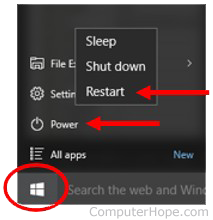
The Start menu returns in Windows 10, allowing users to access the power options easily.
- Click Start in the lower-left corner of the screen.
- Click the Power option.
- In the Power menu, select the Restart option.
Windows 8 and 8.1
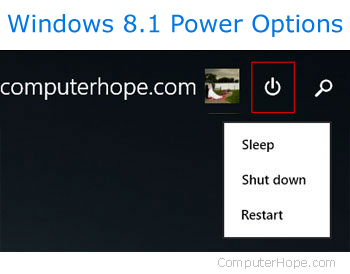
Neither of these versions of Windows has the Start menu. However, with the 8.1 update, Microsoft added the power options button to the upper-right corner of the Start screen that allows users to restart their computer quickly. Click the power options icon (squared in red in the image below) and select Restart from the drop-down menu.
Windows Vista and 7
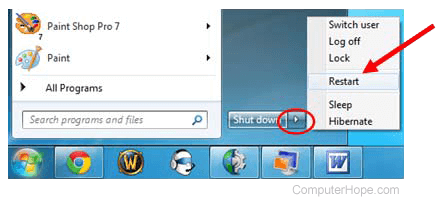
In both Windows Vista and Windows 7, users may restart their computer through the Start menu using the following steps:
- Click Start in the lower-left corner of the Windows desktop.
- Locate and click the right arrow (shown below) next to the Shut down button.
- Select Restart from the menu.
Windows XP and prior versions
- Click Start in the lower-left corner of the screen.
- Click the Shut Down button.
- Select Restart in the drop-down menu.
- Click OK.
Using Ctrl+Alt+Delete to restart
If your mouse (or touchpad) isn't responding, or you don't have a mouse, you can restart your computer using your keyboard. If you press the Ctrl+Alt+Del keys on your keyboard simultaneously, it brings up an administrative menu. This menu differs between versions of Windows, but each one allows users access to the Restart function. Select the version of Windows on your computer in the list below and follow the instructions.
If the computer has a blue screen or another error, try the Ctrl+Alt+Del method of rebooting.
Select the version of Windows on your computer in the list below and follow the instructions.
Windows 10 and 11
In Windows 10 and Windows 11, pressing Ctrl+Alt+Del takes you to the Windows lock screen. To restart Windows:
- Locate and click the power icon in the lower-right corner of the lock screen. It should be the icon furthest to the right.
- Select Restart from the menu.
Windows 8
Users of Windows 8 will be taken to the Windows lock screen upon pushing Ctrl+Alt+Del. To restart Windows:
- Locate and click the black power button in the lower-right corner of the screen.
- Select Restart from the menu.
Windows Vista and 7
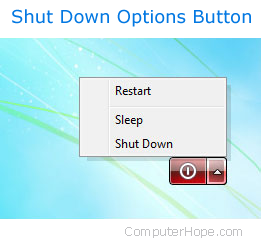
In Windows Vista and 7, pressing Ctrl+Alt+Del takes users to the Windows lock screen containing several options. In the lower-right corner, there is a red button with an arrow next to it. Clicking this button opens a list of shutdown options, as you can see in the image. To restart your computer using this menu:
- Click the red arrow to open the menu.
- Select Restart to reboot your machine.
Windows XP and prior
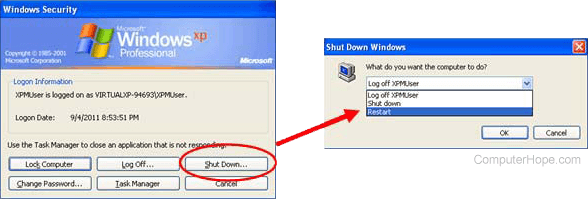
In Windows XP and earlier, Ctrl+Alt+Del brings up the Windows Security screen. To restart:
- Click the Shut Down button.
- In the new window, click the down arrow and select Restart from the drop-down menu.
- Click OK.
Using the Windows command line
You can shut down or restart a Windows computer using the Windows command prompt by following the steps below.
- Open the Windows Command Prompt.
- To shut down Windows, type shutdown -s and press Enter.
- To restart Windows, type shutdown -r and press Enter.
If you access Windows on a computer through a remote desktop connection and execute the shutdown or restart command, the remote desktop connection will be terminated. If you execute the restart command, you can reconnect to that computer once it has restarted. If you executed the shutdown command, you can't reconnect to and start-up that computer remotely.
How to reboot from an error message
If the computer encounters an error, you can reboot or restart the computer by pressing the Ctrl+Alt+Del keys simultaneously. If these keys do not work, you can also perform the physical restart mentioned below.
Physical restart with button on computer

You can use the computer's power button to restart. Press the power button once and wait for the computer to shut down. Press the power button again to turn the computer back on.
If your computer is frozen or does not turn off, press and hold the power button for five seconds to manually shut the computer off. This action is known as a hard reset and should only be done if all of the above options do not work.
Some computers also have a reset button next to or below the power button.