
Reboot
A Reboot may refer to any of the following:
1. A reboot is restarting a working computer using hardware (e.g., a power button) instead of software. Rebooting is sometimes necessary after installing a program, installing operating system updates, to recover from an error, or re-initialize drivers or hardware devices.
How to do a hard reboot
To perform a hard reboot or cold reboot, press and hold down the power button on the computer. After 5-10 seconds, the computer should turn off. Once the computer is off, wait a few seconds and then turn the computer back on.
What should happen when I reboot?
When you reboot a computer, all open programs should close. Then, the computer should turn off briefly and then turn back on.
What if the computer fails to reboot?
If the computer is frozen or does nothing when attempting to reboot, press and hold the power button for 10-15 seconds to turn off the computer. After the computer is off, wait 3-5 seconds and turn it back on.
Where is the restart or reboot button?
Today, many computers no longer have a reboot button. For those computers with this button, it's found next to the power button and is often smaller than the power button.
Why should I reboot?
Rebooting a computer helps resolve many issues, such as Internet connectivity problems, slow browser response, and software issues. Essentially, it "starts over" any code working improperly.
Hard reboot vs. soft reboot
A reboot may be a cold reboot or hard reboot, meaning the power was physically shut off and then turned back on. It can also be a warm reboot or soft reboot, which means the system restarted without losing power.
Users should only perform a hard reboot if the computer is completely frozen or no picture is displayed on the monitor, as it may damage hardware components.
What key combination allows me to restart?
For PCs running Microsoft Windows, press Ctrl+Alt+Del (three-finger salute) to access a menu that lets you reboot or restart the computer.
These keys are the closest thing to a keyboard shortcut to rebooting the keyboard. However, in Windows, you can create a batch file that reboots the computer and then create a shortcut to run that batch file. For help creating a batch file to reboot the computer, see: How to shut down or restart the computer with a batch file.
Reboot vs. restart
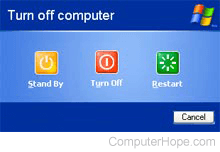
Restart refers to an operating system closing all programs before a soft reboot. The image shows the "Turn off computer" prompt in Windows XP, with the previously mentioned Restart option.
Erasing the computer and restarting over
Some may refer to a reboot or restart as erasing the computer and starting over. For information about erasing the computer and starting over, see the following document.
2. Linux users see the reboot command for further information about rebooting a Linux computer from the command line.
Windows users looking for a reboot command should see the shutdown command.
Auto restart, Boot, Bounce, Cold boot, Hardware terms, Power cycle, Reset, Shutdown, Warm boot