
How to download, open, and save e-mail attachments

E-mail is an excellent tool for communicating with other users over the Internet. In addition to messages, e-mail allows users to send and receive pictures, videos (small), documents, and other media through attachments. The following sections show you how to download, open, and save e-mail attachments sent to your e-mail inbox on a Windows or Mac computer.
How to download webmail attachments
The directions in this section are for web-based e-mail services, also called webmail. These services require an online account to access them (e.g., Gmail or Yahoo! mail).

Google Gmail
- Go to the Gmail website and sign in if necessary.
- Open the message containing the attachment(s) you want to download.
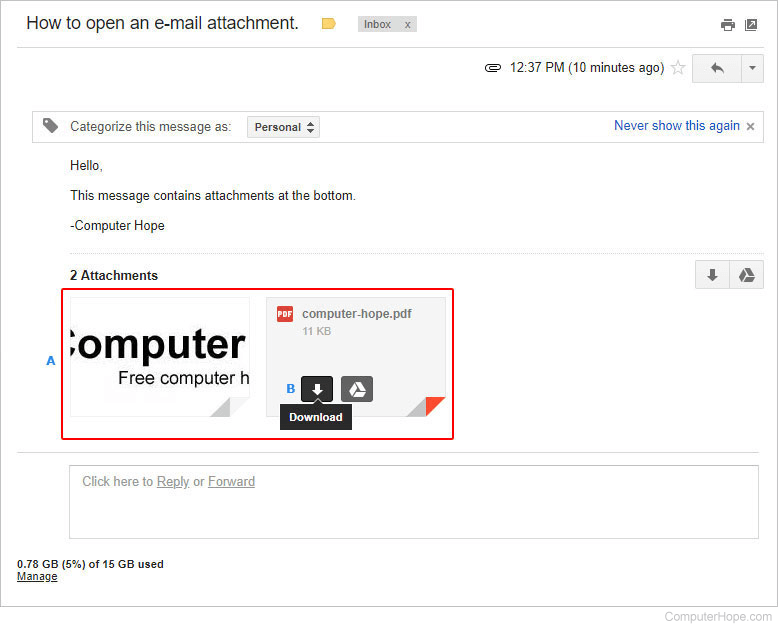
- Any attachments are shown in the bottom-left corner of the message body (A).
- To download the attachment(s), move your mouse cursor over each attachment and click the download arrow (B).
- A prompt appears to let you know when the download is complete. The location of this prompt and the related instructions depend on the Internet browser you're using. For further information, see: How to open and save webmail attachments.

Outlook.com (formerly Hotmail)
- Go to the Outlook.com website and sign in if necessary.
- Open the message containing the attachment(s) you want to download.
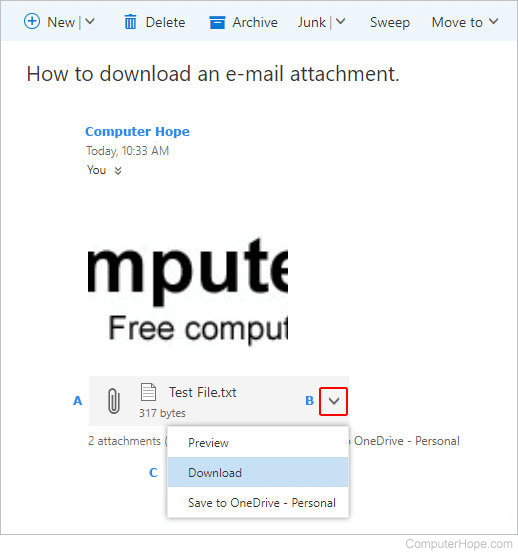
- The attachments are above the body of the message (A).
- Move your mouse over the right side of the attachment and click the down arrow (B).
- From the drop-down menu, select Download (C).
- A prompt appears to let you know when the download is complete. The location of this prompt and the related instructions depend on the Internet browser you're using. For further information, see: How to open and save webmail attachments.

Yahoo! Mail
- Go to the Yahoo! Mail website and sign in if necessary.
- Click the message containing the attachment(s) you want to download.
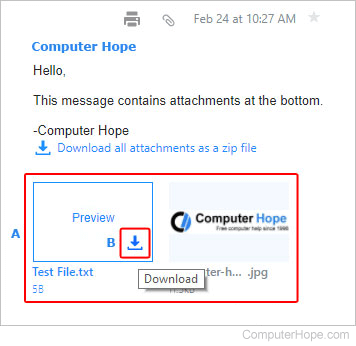
- The attachment(s) are below the body of the message (A).
- Move your mouse over the right side of the attachment and click the down arrow (B).
- A prompt appears to let you know when the download is complete. The location of this prompt and the related instructions depend on the Internet browser you're using. For further information, see: How to open and save webmail attachments.

Aol Mail
- Go to the Aol Mail website and sign in if necessary.
- Open the message containing the attachment(s) you want to download.
- The attachment(s) are below the body of the message (A).
- Move your mouse over the right side of the attachment and click the down arrow (B).
- A prompt appears to let you know when the download is complete. The location of this prompt and the related instructions depend on the Internet browser you're using. For further information, see: How to open and save webmail attachments.
How to open and save webmail attachments
Different browsers use different methods for viewing and moving e-mail attachments. Once your attachment is downloaded, select your preferred browser from the list below and follow the directions.
Once the file is downloaded, it can be opened from your downloads folder; see: Where are the files I downloaded using my web browser?
Once you've opened the downloaded file with the appropriate program, save it to the storage device of your choosing.
Some files require specific software. For example, the .xls or .xslx file extensions require a program like Microsoft Excel or Google Sheets to open and view them. If you don't have the program needed to open an e-mail attachment, ask the e-mail sender to save the file as another file type, if possible.

Google Chrome
After the download has completed, a prompt appears in the upper-right corner of the browser window. Click the download prompt to open the file.


Mozilla Firefox
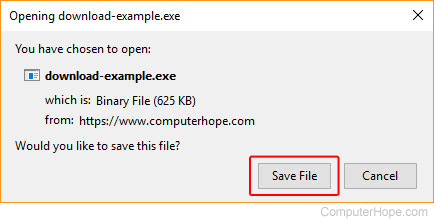
- After the download has completed, a prompt appears in the center of the browser window. Click Save File and select where to save the file on your computer.
- After the file is saved, click the downloads progress
 icon in the upper-right corner of the browser window, and click the downloaded file to open it.
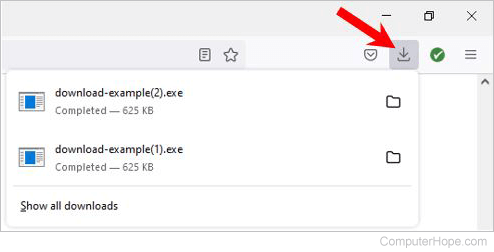
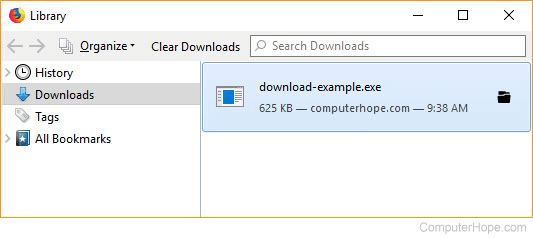
Alternatively, press Ctrl+J to open the Downloads section of the Library.
- In the Library window, double-click the downloaded file to open it.

Internet Explorer
- After the download has completed, a prompt appears at the bottom of the browser window. Choose Run or Save to open the downloaded media.

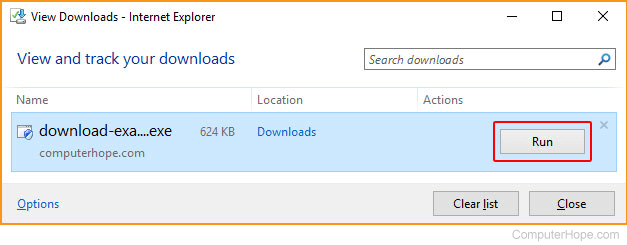
- In the View Downloads window, locate your downloaded file and click the Run button to open it.

Microsoft Edge
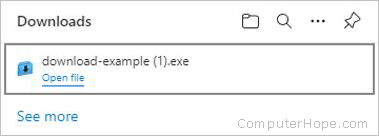
- Click the downloaded file to open it.

Opera
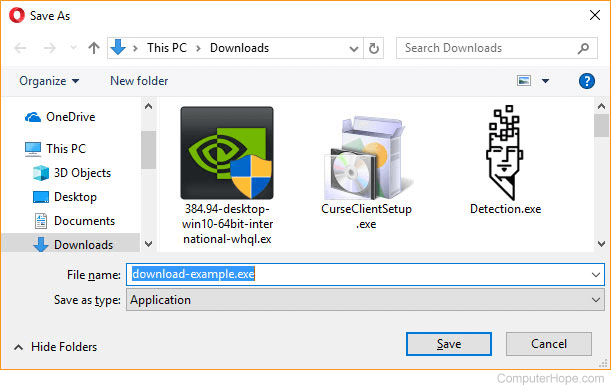
- After clicking the attachment, you are prompted to choose where the download should be saved. Select a location and click Save.
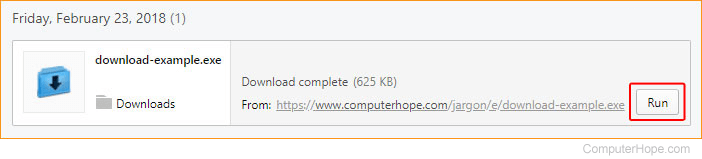
- When the download completes, press Ctrl+J to view your recent downloads.
- In the Downloads window, locate your downloaded file and click the Run button to open it.
How to save offline e-mail program attachments
This section has directions for saving attachments from messages sent through e-mail programs installed in Windows, not those that are web-based. After the attachment file is saved, it can be copied or moved to any location, including an external drive or flash drive.

Mozilla Thunderbird
- Open the e-mail message containing the attachment.
- Right-click the picture or file and select Save As or Save Image.
- Specify the location where you want to save the file. You may also change the file name at this point.
Microsoft Outlook
In newer versions of Outlook (Outlook 2010 and later), right-click the file and select Save As if the attachment is a separate file. Save the file anywhere on your computer. If there are multiple attachments in the e-mail, select the Save All Attachments option.
There is no Right-click to save option in older versions of Outlook (before Outlook 2007). However, there are a few workarounds to save your e-mail images and files. You may have to try more than one option depending on your version of Outlook.
- Open the e-mail message, and under the Message tab, select Other Actions, then View in Browser. This method lets you save your attachments the same way you would with web-based e-mail.
- Copy an image to the clipboard and paste it to photo editing software, such as Paint or Adobe Photoshop. Once the image is pasted, save it by opening the File menu and selecting Save or Save As.
- Open the e-mail message and save it as an HTML (HyperText Markup Language) file by clicking File at the top-left corner, select Save As, and choose the Web page format. This method saves all the embedded pictures in one folder, making it useful to download multiple images from the same message.

Apple Mail
This section contains instructions for those using macOS on a desktop or laptop computer. If you're on an iMac or MacBook, follow the steps below.
- Open Apple Mail.
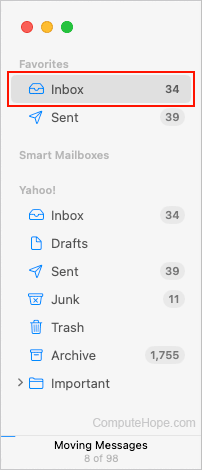
- In the sidebar, click the folder with the message containing the attachment. We're using the Inbox for this example.
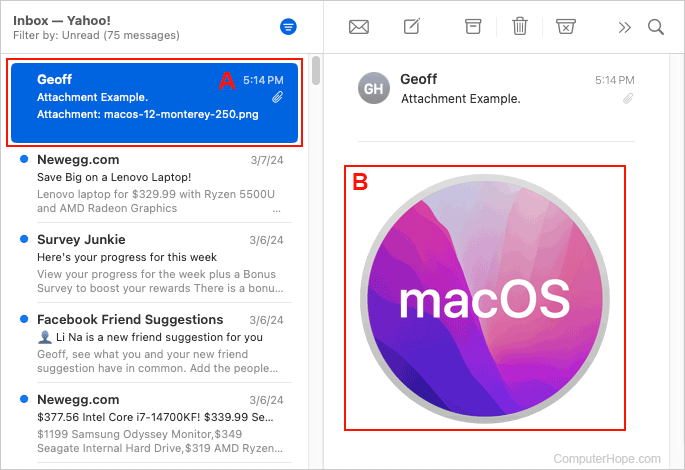
- Select the message containing the attachment (A). Then, double-click the attachment to open it (B).
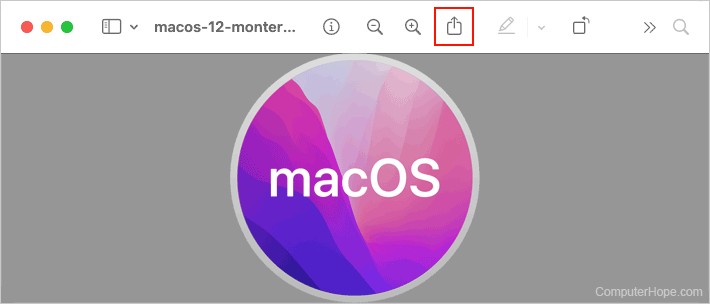
- Once opened, download the message by clicking the Share the document icon.
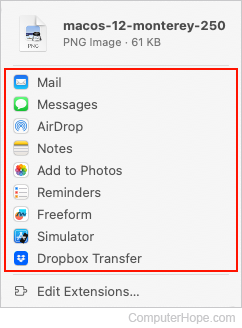
- Choose a destination in the drop-down menu.
E-mail on an iPad or iPhone
If you view e-mail on an iPad or iPhone and want to save an attachment, follow the steps below.
For pictures:
- Open the e-mail message.
- Tap the photo in the e-mail to view the photo as fullscreen.
- Gently press your finger on the image until a menu is displayed.
- In the menu, select Save Image.
Images saved using this process should be accessible in the photo album on your device.
For other attachments:
- Open the e-mail message.
- Tap the attachment to download it.
- If the attachment doesn't open on its own, look for it in your downloads app.